
Modern Marketing: Navigating Digital Trends with Project Tools

As digital transformation in marketing accelerates, staying ahead of the curve is crucial. As we step into 2024, global digital ad spending is projected to reach a staggering $526 billion, underscoring the fierce competition and the rapid speed of change in the industry. For digital marketing professionals, this means the necessity to adjust quickly and effectively to these evolving trends is more important than ever. Project tools help them do that, by giving them the structure and support they need to handle the challenges of modern marketing. In this post, we will look at how fast paced digital marketing is, how staying ahead gives an edge, and how project tools improve collaboration, simplify workflows, and connect with key marketing platforms. Let’s explore how project tools are crucial for staying ahead of digital trends. 

The Fast-Paced Nature of Digital Transformation in Marketing

How Digital Transformation is Reshaping Marketing

Digital marketing started in the late 1990s and has changed a lot since then. The first clickable web ad in 1993 was a big step, changing how traditional marketing worked. Technology like search engines, social media platforms, and mobile devices have also changed the digital world over time. More changes happened with better data analytics tools and automated marketing systems, which made campaigns more personal and specific. These notable events have created a marketing environment that is always changing and adapting.

Emerging Trends in Digital Transformation and Marketing Challenges

The digital marketing environment is constantly changing and developing the latest trends. Marketers are increasingly using artificial intelligence (AI) and machine learning to understand consumer behavior and anticipate trends. Social media platforms keep changing, offering new opportunities to connect with audiences through live streaming, stories, and interactive content. Furthermore, the rise of influencer marketing and the focus on authentic, user-generated content show the change towards more personalized and relevant marketing strategies.

However, these trends also pose significant difficulties. Marketers must continually adjust to modern technologies and platforms, which require constant learning and adaptability. The digital transformation in marketing means that keeping up with the changes is essential, but it also requires a lot of time and resources. Privacy issues and data security challenges add another level of complexity, as marketers must follow regulations like GDPR while keeping consumer trust. Finding a balance between innovation and compliance and ethical factors is a continuous challenge in this fast-moving digital era.

Staying Ahead in the Digital Transformation of Marketing

Competitive Advantage

It is vital for digital marketing to keep up with trends to gain a competitive advantage. Companies that actively change to modern technologies and strategies are more likely to gain market share and drive growth. For example, Netflix’s early use of streaming technology changed the entertainment industry, allowing it to beat traditional cable providers. In the same way, Amazon’s creative use of data analytics and AI has helped it to provide highly customized shopping experiences, setting a standard for e-commerce. These examples show the importance of adopting digital transformation in marketing to stay ahead of competitors and make use of emerging opportunities.

Consumer Demands

Today’s consumers expect personalized and prompt interactions. They have access to a lot of information and options, and they want experiences that are customized to their individual needs and tastes. This changes how marketing strategies work. Brands need to use data to learn about consumer behavior and offer relevant content at the right times. The digital transformation in marketing makes this possible by providing tools and platforms that allow real-time data analysis and automated marketing processes.

Personalized marketing not only improves customer satisfaction but also strengthens brand loyalty. For instance, Spotify’s algorithm-driven playlists and suggestions create a distinctive and enjoyable user experience, making a strong connection with its audience. As consumer demands keep changing, brands that focus on personalization and timely engagement will be more prepared to meet these challenges and excel in the competitive digital environment.

Project Tools: Pioneers of Digital Transformation in Marketing

Project Tools for Marketing

There are various project management tools that help marketers work better and faster in the digital era. Tools like Trovve, Trello, Asana, and Monday.com have unique features and functions to suit different marketing needs. Trovve is a project tool that uses AI and Microsoft 365 to make project creation, management, and customization easier and smarter. Trovve is made to simplify and optimize project management for modern marketers. Improving Teamwork and Communication. Trello has a simple, card-based interface that makes task management visual and easy. Asana has strong task tracking and project timeline features, making it great for complex project planning. Monday.com is very customizable, letting teams create workflows that exactly match their specific processes and needs. These tools, and others, provide the flexibility and efficiency needed to manage modern marketing projects well.

Improving Teamwork and Communication

Teamwork and communication are essential in digital marketing, where teams often work across various places and time zones. Project tools help to enhance seamless teamwork by providing shared workspaces, real-time updates, and integrated communication channels. For example, Slack works with Trello and Asana, letting team members talk about tasks and projects within the same platform. A notable case study is that of a global marketing agency that used Asana to run its campaigns. The tool improved coordination among its distributed teams, resulting in a 30% increase in project completion rates and better client satisfaction. Such examples highlight the importance of project tools in supporting effective collaboration and communication in the digital age.

Improving Workflows and Processes

Effective workflows are essential for digital marketing success. Project management tools help improve processes by automating routine tasks, monitoring progress, and giving insights into project performance. For example, Trovve is incredibly good at handling content creation workflows, from brainstorming to publishing. By automating task allocations and deadline notifications, Trovve makes sure that content production stays on track. Likewise, Monday.com’s automation features reduce manual work, allowing teams to focus on strategic activities. These tools not only increase productivity but also improve the overall quality of marketing efforts. The digital transformation in marketing is assisted by these project management tools, which enable marketers to manage their time and resources more effectively, leading to better results and ROI.

Key Features of Effective Project Tools for Marketers

Integration with Marketing Platforms

A key feature of effective project tools in the digital transformation of marketing is the ability to integrate seamlessly with different marketing platforms. This integration with social media, email marketing, and analytics tools helps to coordinate and centralize all marketing activities and data. Trovve can help you use AI to generate a Content calendar then push content to Microsoft apps like word so you can safely store the information. Trello streamlines campaigns from one interface by integrating well with platforms like Hootsuite for social media management and Mailchimp for email marketing. Asana’s integration with Google Analytics gives teams valuable insights within the project management tool, allowing them to track their campaign performance in real-time. These integrations improve efficiency and ensure that marketers can make quick data-driven decisions.

Analytics and Reporting in Real Time

Analytics and reporting in real time are essential for making smart marketing choices. The ability to access current data helps marketers react quickly to changing patterns and adjust their strategies on the spot. Tools like Monday.com and Asana offer powerful analytics and reporting features that provide comprehensive insights into project status, team productivity, and campaign efficiency. Monday.com’s dashboard features allow teams to display data in different formats, making it easier to spot problems and opportunities. Real-time reporting ensures that marketing activities are consistent with business objectives, enabling ongoing optimization and better results.

Flexibility and Scalability

Project management tools need to be flexible and scalable, especially in the fast-changing digital marketing field. As businesses expand and marketing strategies change, the tools should scale up to match new needs. Trovve, Trello and Monday.com are notable examples of this, with customizable workflows and scalable solutions that suit small teams and large organizations. For example, Monday.com’s modular approach lets businesses add new features as they need them, making sure the tool grows with the company. This flexibility is vital for keeping efficiency and supporting ongoing digital transformation in marketing.

Good project tools not only work well with existing marketing platforms but also give real-time analytics and the flexibility to grow with the business. These features help marketers keep up with trends, make decisions based on data, and scale their operations effectively, ensuring long-term success in a quickly changing digital landscape.

Implementing Project Tools: A Strategy for Digital Marketing Transformation

Assessing Your Needs

Pick the right project tools by knowing your team’s needs. Find out what your marketing team needs most from the tools. Start by finding the main problems in your workflow now. Are there communication issues? Is task tracking hard? Do you need more data integration? Then, make a checklist to compare different project management tools. Think about factors like how easy they are to use, how well they connect with other tools, how much you can customize them, and how much they cost. The marketing world is changing fast, so you need tools that can solve current issues and adjust to future ones.

Training and Onboarding

To use project tools well, your team needs proper training and onboarding. Otherwise, they may find the new tools hard to use, causing annoyance and lower productivity. Train them well from the basics to the advanced features. Use interactive tutorials, hands-on workshops, and Q&A sessions. Promote a culture of continuous learning by giving ongoing support and resources. Taking time to onboard well helps your team use the new tools smoothly in their daily workflows, making the most of the digital transformation in marketing.

Continuous Improvement

Implementation is not the final stage; it is essential to keep improving the project tools. Ask your team regularly for feedback on how the tools are working and what problems they might have. You can use surveys, team meetings, and one-on-one conversations to get this feedback. Look at the data to find patterns and opportunities for improvement. Change the tool settings, workflows, or training programs as needed based on this feedback. Creating a culture of continuous improvement where people can share their opinions about the tools’ performance helps your team stay agile and efficient. This ongoing process is crucial for keeping up with the fast-changing world of digital marketing.

Future Trends: Project Tools Leading Digital Marketing Transformation

AI and Machine Learning

Project management tools are being transformed by artificial intelligence (AI) and machine learning, which are leading the digital shift in marketing. These technologies improve efficiency by automating repetitive tasks, estimating project results, and providing data-driven insights. For example, AI can use previous project data to estimate timelines and spot potential problems. Tools like Trovve, Asana and Monday.com are already adding AI features to offer smart task recommendations and enhance workflows. Looking forward, we can expect more advanced AI capabilities, such as natural language processing for better communication and sophisticated predictive analytics to foresee market trends, further simplifying marketing efforts and improving decision-making processes.

Better Automation

Automation is an important trend that affects the future of project management tools, with significant consequences for marketing. Better automation features lower the manual work needed for repeated tasks, allowing marketers to concentrate on strategic activities. For example, Zapier links different apps to automate workflows, such as keeping social media calendars updated or sending email reports. Monday.com’s automation recipes let teams set triggers and actions, like alerting team members when tasks are done, or deadlines are near. As automation technology improves, we can look forward to more smart and adaptable automation options, improving productivity and making sure that marketing campaigns are effective and trouble-free.

How to Collaborate Remotely

Remote work has had a significant impact on the design and functionality of project tools. Remote collaboration needs effective communication and coordination features. Tools like Trovve, Trello, and Slack are great in this area, offering shared workspaces, real-time updates, and integrated communication channels. Trovve has features such as a team hub, work cards, daily work reports, and employee details. Trovve also makes communication easy via Microsoft Teams or email and sends automatic reminders to users to wrap up their day. Trovve can help increase accountability, transparency, and productivity among remote teams. Trello’s visual boards help remote teams stay organized, while Slack’s channels enable instant communication. As remote work becomes more common, project tools will keep evolving, offering improved features such as virtual collaboration spaces, advanced video conferencing integrations, and real-time collaboration analytics. These innovations will support smooth remote teamwork, ensuring that marketing teams can work together effectively regardless of their physical location.

Conclusion

Keeping up with trends is vital for staying competitive in the ever-changing digital marketing world. We looked at how digital marketing has changed and what the current trends are, the importance of meeting customer expectations, and how project tools like Trovve, Trello, Asana, and Monday.com improve collaboration, simplify workflows, and integrate well with marketing platforms. Adopting these tools helps marketing teams adapt to the digital transformation in marketing and work effectively and efficiently.

To succeed in this dynamic environment, it is important to assess and use project tools that suit your team’s needs. Tools like Trovve can improve your marketing strategy, increase productivity, and help you keep up with the changes. Start today by trying out these project tools and adding them to your workflow to achieve success and stay competitive in the digital age.

Additional Resources
Links to Tools

Further Reading

Books: 

Articles: 

  • “Top Digital Marketing Trends to Watch in 2024” – Forbes 
  • “How AI and Machine Learning are Transforming Marketing” – Marketing Week 

These resources will provide additional insights and practical knowledge to help you stay ahead in the dynamic field of digital marketing. 

 

Enhance Efficiency: Streamlining Accounting with Project Tools and AI

Automation and AI have boosted operational efficiency for most accounting firms in a fast-changing financial environment. These technologies are essential for the accounting industry, as they simplify tedious tasks, improve data quality, and offer more insights, changing how accountants handle their workflows. But to make the most of these technologies, you need the right accounting automation tools. This blog will show you how accounting automation tools can help your firm work more efficiently by making it easier to use automation and AI, leading to better, faster, and more compliant accounting practices. 

The Need for Automation and AI in Accounting

Current Challenges in Accounting

Accounting, a field that usually involves manual processes, faces many challenges. Manual data entry, invoice processing, and reconciliation are not only slow but also likely to have human error. These inefficiencies can result in expensive errors and delays, reducing overall productivity.

Another big challenge is the growing complexity of regulatory compliance. Accountants must follow a maze of changing regulations, making sure that their practices comply with local, national, and international standards. This task is difficult and requires careful attention to detail, often exceeding the resources of accounting firms.

Moreover, the need for real-time data and insights is extremely high. In today’s fast-moving business environment, clients want up-to-date financial information to make smart decisions. Traditional accounting methods often fail to provide the prompt insights needed, putting firms at a disadvantage.

Benefits of Automation and AI

Automation and AI help overcome accounting challenges. They reduce errors and save time by automating regular tasks. Accountants can focus more on strategic activities. Automation tools also boost productivity and efficiency, handling copious amounts of data and transactions. This lowers costs and improves client service. Furthermore, AI analytics provide better insights into financial data. These tools can predict and advise, enhancing decision-making. This is important for accountants who need to offer strategic counsel to their clients.

Understanding Project Management Tools

Definition and Features

Project management tools are software applications that help with planning, organizing, and managing resources to achieve specific project objectives. These tools have a range of features that are especially useful in the accounting industry, improving the efficiency and effectiveness of accounting automation tools.

Task management is one of the key features of project management tools. It enables accountants to create, assign, and monitor tasks, making sure that every element of the accounting process is carefully managed, and deadlines are always met. Workflow automation is another essential feature. By automating routine tasks, project management tools help simplify processes such as invoice approval and data entry, easing the workload on accounting staff and reducing errors.

Real-time collaboration is also a notable feature. Project management tools enable smooth communication and collaboration among team members, no matter where they are. This is particularly important in today’s more remote work settings. Features such as file sharing, real-time updates, and collaborative document editing ensure that all team members are coordinated, improving productivity and efficiency.

Top Project Tools for Accounting

Some project management tools are popular in accounting because of their powerful and easy features. Trovve is less known, but it has specialized features for accounting and finance. It is a cloud platform that uses automation and AI to help users create and manage projects. It can make project names, descriptions, tasks, and sections from user input. It also lets users copy projects, do actions on many tasks, and work together in real time. Trello is common for its simple board and card system, which helps teams see tasks and workflows. Asana is another good option, with great project and task management features that help accountants be organized and on time. Monday.com is also liked by accountants. Its flexible and customizable interface lets accounting firms adjust the tool to their needs, and it works well with other accounting automation tools

Integrating Automation and AI with Project Tools

Streamlining Processes

Project management tools are essential for simplifying processes by automating recurring tasks, improving the effectiveness of accounting automation tools. Tasks such as data entry, invoice processing, and transaction reconciliation, which traditionally take a lot of time and are subject to human error, can be automated using project management tools. For example, by connecting project tools like Asana with accounting software, firms can automate the process of invoice approvals, from submission to final payment, cutting down processing time and reducing errors.

A good example is the accounting firm Lewis Financial Services, which used Trello together with their accounting software. By setting up automated workflows for tasks such as client onboarding and document verification, they were able to cut down manual work by 40%. This not only saved time but also enabled their accountants to focus on higher-value tasks, enhancing overall productivity and client satisfaction.

Enhancing Data Management

Integrating project tools with accounting automation tools also improves data management. Project management software can process and store large datasets effectively, providing a convenient place for data access and storage. Tools like Monday.com have features such as real-time data changes and joint data analysis, which help accounting teams work with current information smoothly.

For example, these tools can use AI-driven insights to analyze past financial data and provide precise forecasts and reports. An AI module linked with a project management tool can anticipate cash flow patterns, detect possible financial risks, and suggest strategic actions, which improve decision-making processes. This kind of analysis is extremely useful for financial planning and strategic management, giving firms an advantage.

Improving Compliance and Accuracy

Regulatory compliance is an essential part of accounting, and project tools help a lot in this area by automating compliance tests and updates. Project management tools can be set up to track regulatory changes and make sure that all accounting practices follow the latest standards. For example, an accounting firm using Asana can create automated reminders and checklists to make sure that all compliance-related tasks are done on time and correctly.

One practical example is the use of compliance modules within project management tools, which constantly check and update compliance requirements. This helps firms stay compliant with changing regulations, lowering the risk of penalties, and improving the reliability of financial reporting. By using these tools, accounting firms can make sure that all processes comply with current laws and regulations, giving them confidence and protecting their reputation.

Benefits of Using Project Management Tools for Automation and AI Integration

Increased Efficiency

Accounting firms can save a lot of time and money by using project management tools with accounting automation tools. They can automate boring tasks and make workflows smoother, so they can spend less time on routine activities and more on strategic goals. This boosts productivity and lowers costs.

For example, automating invoice processing can save up to 60% of the time for this task, giving accountants more time for important things like financial analysis and client advice. John Doe, an accounting technology expert, says, “Project management tools have changed our accounting methods. We have cut the time for administrative tasks by half, which lets our team offer more value to our clients.”

Better Collaboration and Communication

A major advantage of project management tools is that they enable team members to collaborate in real time. These tools have features such as shared task lists, collaborative document editing, and real updates, which help keep everyone on the team aligned.

For example, an accounting firm can use a tool like Trello to create shared boards where team members can post updates, assign tasks, and share documents. This real-time collaboration improves team coordination and helps projects stay on course. Also, tools like Asana offer integrated communication features, which allow team members to communicate and give feedback directly within the platform. This not only enhances internal communication but also improves client communication, as clients can be given access to specific boards to check progress and give input.

Scalability and Flexibility

Project tools are essential for the growth and agility of accounting operations. As firms expand, they face more tasks and more complex projects. Project tools like Monday.com offer solutions that can grow with the needs, allowing firms to handle bigger projects and more clients without losing efficiency.

Additionally, these tools provide the ability to adjust to changing client expectations and market situations. For instance, if a client wants more frequent reports or extra services, project management tools can easily change workflows and task assignments to meet these changes. This flexibility ensures that firms can react quickly to market movements and client requests, keeping a competitive advantage.

Implementation Strategies for Accounting Automation Tools

Assessing Current Processes

To integrate project management tools with accounting automation tools, start by assessing your current workflows. Document all the processes in your accounting firm, highlighting tasks that are manual and tedious and can be automated. For example, data entry, invoice processing, and reconciliation. Examine your processes carefully to find out where there are delays and waste. Ask for input and suggestions from your team members to identify where you need to make improvements. Then, rank these areas by how much they affect overall efficiency and how likely they are to be automated.

Choosing the Right Tools

Choosing the best project management tools is essential for integration success. Evaluate tools based on criteria like ease of use, scalability, integration with existing accounting software, and automation features. Trovve’s AI features simplify project creation and management. Users can answer a few questions to generate names, descriptions, tasks, and sections for their projects. Trello and Asana are user-friendly and have strong task management features. Monday.com offers many customization options, making it suitable for different accounting workflows.

Contrast these tools based on their features. For example, Trello’s board system helps visualize tasks, while Asana’s tracking features help track project progress. Monday. Com’s flexibility lets it grow with your firm, and Trovve’s specialized features can improve financial reporting and compliance management.

Training and Adoption

Staff training is crucial for successful implementation of new tools. Begin by arranging thorough training sessions that explain the fundamentals of the selected project management tools and their connection with accounting automation tools. Make use of online materials, tutorials, and webinars offered by the software providers. Create a support system within your team by assigning ‘tool champions’ who can help others and solve any problems that occur during the transition.

Another important aspect is to overcome resistance to change. Communicate the benefits of the new tools clearly, highlighting how they will lessen workload and improve efficiency. Involve team members in the decision-making process to increase their buy-in. Provide ongoing support and collect feedback to make necessary changes, ensuring the tools are being used effectively.

Future Trends

New Technologies

Emerging technologies, especially developments in AI and automation, are set to change the future of accounting. These technologies are becoming more advanced, allowing for more complicated tasks such as forecasting, fraud prevention, and dynamic financial analysis. Accounting automation tools powered by AI are expected to further decrease manual work, improve accuracy, and provide more insights into financial data. For example, machine learning algorithms can now examine copious amounts of data to find patterns and outliers that would be too hard for humans to spot quickly.

Project management tools are also changing with these developments. Modern project tools are using AI to automate task allocation, estimate project duration, and provide real-time analytics. For instance, tools like Asana and Monday.com are adding AI features to improve task ranking and resource distribution, ensuring that accounting teams can work more effectively and proactively deal with potential problems before they happen.

Getting Ready for the Future

Accounting firms need to plan to keep up with these technological trends. Ongoing learning is vital; firms should support their staff to take part in continuous education and training programs that focus on emerging technologies. Joining industry conferences, attending webinars, and reading relevant publications can help teams keep up with the latest advances in AI and accounting automation tools.

Change is also especially important. Firms should be flexible, prepared to adopt modern technologies as they become accessible. This means not only buying the latest tools but also creating a culture that welcomes change and innovation. By frequently evaluating and improving their processes, firms can make sure they stay ahead of the game and use the full benefits of emerging technologies.

Conclusion

Accounting firms can gain a competitive edge by integrating project management and accounting automation tools, which offer numerous benefits such as enhanced efficiency, data management, compliance, and accuracy. These tools leverage AI and automation to simplify processes, improve collaboration, and adapt to changing needs and conditions. Firms should embrace these technological advancements to optimize their operations and prepare for a more digital future.  

Ready to revolutionize your accounting practice? Discover the power of Trovve, visit us to learn more and sign up for a free trial. 


Remote Work and Mental Health: Strategies for Thriving in Isolation

Working remotely has its pros and cons. The remote aspect can empower you to set your own schedule, create a more relaxed workspace, and take more productive breaks. However, maintaining a healthy routine can be incredibly difficult without the structure, daily social interactions, or environmental shifts that happen when you work in an office outside your home. 

By working in an isolated environment, you can start to lose touch with co-workers, friends, and the outside world in general, resulting in compromised mental health that affects your personal and professional productivity. Fortunately, it doesn’t need to be that way. 
 

There are strategies for improving your mental health as a remote worker and regaining control over your schedule. Today, we’ll explore eight of them.  


Strategy 1: Get out of the house in your free time while working remotely

One of the simplest and most effective strategies for combating work isolation is to remove yourself from your home office space whenever you can. Spending too much time indoors can give you a serious dose of cabin fever, but getting some fresh air and a change of scenery makes a significant difference.  

Going for a morning run before work starts, popping out for a coffee or lunch mid-break, or meeting up with friends in the evening all contribute to a clearer, more open state of mind.  

When you work remotely, you run the risk of becoming complacent and accepting that being cooped up is just part of your life now. Break that cycle by deviating from routine every now and then and spending time outside to refresh your mind.  

Strategy 2: Start a remote work chat

Sometimes, the problem with remote working isn’t that you aren’t getting outside the house as much—it’s that you simply miss being around other people. Incorporating other people into your day-to-day routine can alleviate this feeling.  

Remote work is a popular approach, and chances are, many of the people around you feel similarly isolated. Studies show that one in three remote workers find that isolation is their biggest challenge, with loneliness following just behind at 23%. Starting a remote work group chat can help you connect with like-minded people and share tips, coping mechanisms, and general chatter.   

 Strategy 3: Utilize team management tools effectively while working Remotely

If your company doesn’t use a team management or communication tool, getting through your day alone can be hard on a social and professional level. Utilizing technology to manage better communication and collaboration can make a positive difference.  

Team management tools like Trovve help employees communicate with each other throughout the day and create a digital space for sharing important data, updates, and project progressions. Being part of an online team can help people feel more connected to those around them and improve overall productivity.  

Strategy 4: Pick up a creative hobby

If you work remotely, it’s important to do activities that take you away from your screen into a more creative, open-minded headspace. This can help you tap into other ways of thinking, stimulate your senses, boost your self-esteem, and engage with yourself and others in a fresh and unique way.  

Cooking, painting, dancing, drawing, knitting, photography, and pottery are just a few examples of fun, stimulating, and, most importantly, creative ways to spend your time outside work.  

Strategy 5: Create boundaries between home-based work and downtime

One of the most challenging parts about working from home alone is that the lines between work time and free time can become incredibly blurred. This makes it hard to focus during work hours and relax the rest of the time – neither of which is good for your mental health.  

Establishing clear work and relaxation hours can give your routine more structure and allow you to experience better boundaries between these two extremes.  

Step 6: Adopt a pet

The emotional bond between an animal and its carer can positively affect mental health, soothing anxiety, and mitigating depression. A dog or cat can offer emotional support and companionship, reducing feelings of loneliness. 

If you live alone or don’t often spend physical time with others, adopting a pet can bring the necessary purpose and connection into your life and ensure you don’t feel like you’re living in a bubble.  

Step 7: Maintain healthy physical activity while working remotely

Staying active is important for everyone, regardless of what kind of work environment they operate in. But considering how much time remote workers spend in stasis, the need for fresh air and physical movement could be described as even more important than usual.  

Going for an early morning jog, outdoor Pilates class, or tai chi session in the park can help recalibrate your mindset while giving you a much-needed boost of endorphins. When you return to your desk, you’ll feel much more refreshed and ready to focus on work.  

 Step 8: Talk to people about how you’re feeling

 If working remotely is having a serious, ongoing negative impact on your mental health, don’t keep quiet about it. Mental health is just as important as physical health, and it can even impact your physical health if you don’t seek help. Speaking up when you feel something might be wrong is crucial for your overall well-being and quality of life.  

Approach your manager to discuss available workstyle options and find out if there are any ways to make your routine more dynamic.  

Contacting a private therapist or psychologist to talk about what you’re going through can also have life-changing results, as can confiding in someone you love and trust.  

 Final Thoughts

Every workstyle has its pros and cons. Working remotely suits some personality types better than others, but even the most independently self-disciplined people can struggle to maintain strong mental health and sufficient productivity when working unregulated from home.  

By switching up your work locations, maintaining healthy side hobbies, engaging with people and animals more intentionally, and utilizing tech tools, you can carve out a healthier routine for yourself that benefits your life in many sustainable ways.  

FAQs  

  1. Why is isolation a problem for remote workers?
    Isolation can lead to depression, anxiety, and other mental health disorders that negatively impact your life. 
  1. What can you do to prevent feeling isolated when working remotely?
    You can take numerous steps, from using collaboration tools to getting a pet or trying new hobbies. 
  1. Why is routine good for limiting isolation?
    Routines are calming and can help to ensure you schedule your day properly to include free time and other less-isolating activities.  

7 Secrets to Crafting a Daily Schedule That Boosts Your Productivity

Having a good daily schedule can make you successful and less stressed. It helps you use your time and tasks well in a busy world. You can make your daily schedule fit your work and priorities better with Trovve, a project management app. Trovve lets users make custom sections to divide their tasks the way they want. You can sort tasks by urgency, assign them to others, or balance work and life. Trovve’s flexible design works with your rhythm, making your daily schedule a fantastic way to achieve more. 

Secret 1: Integrate ‘Today’s Focus’ into Your Daily Schedule

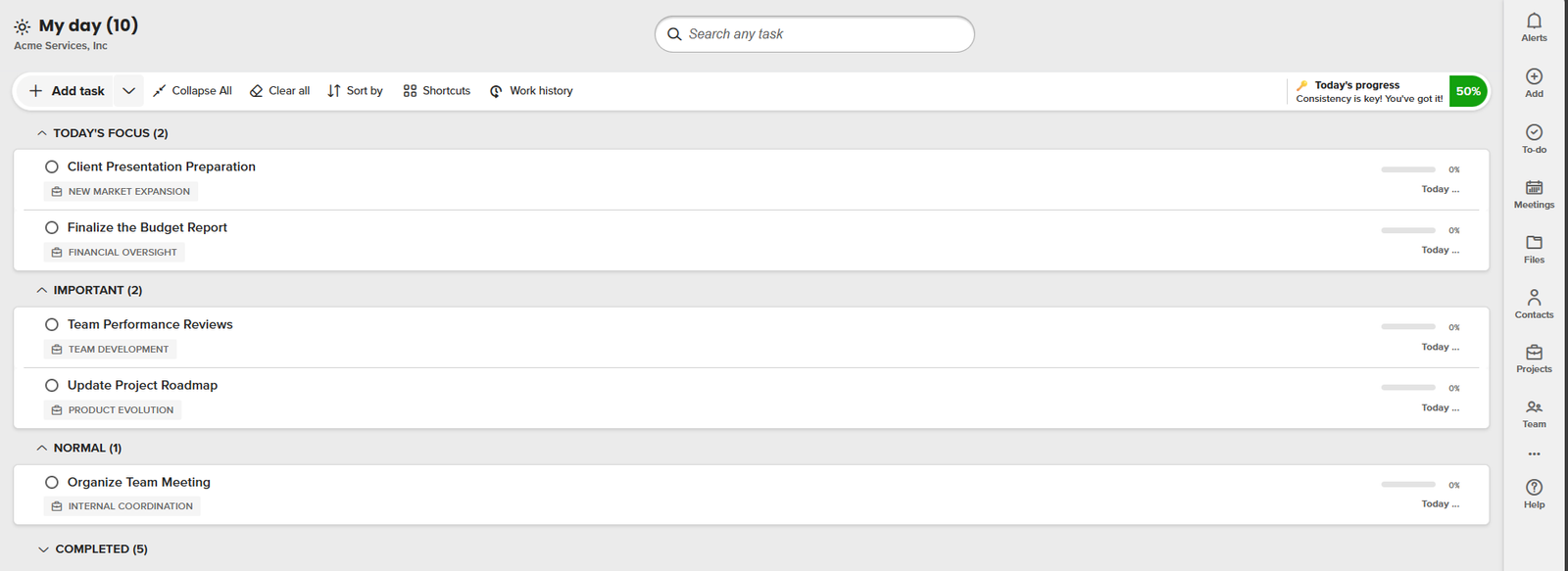
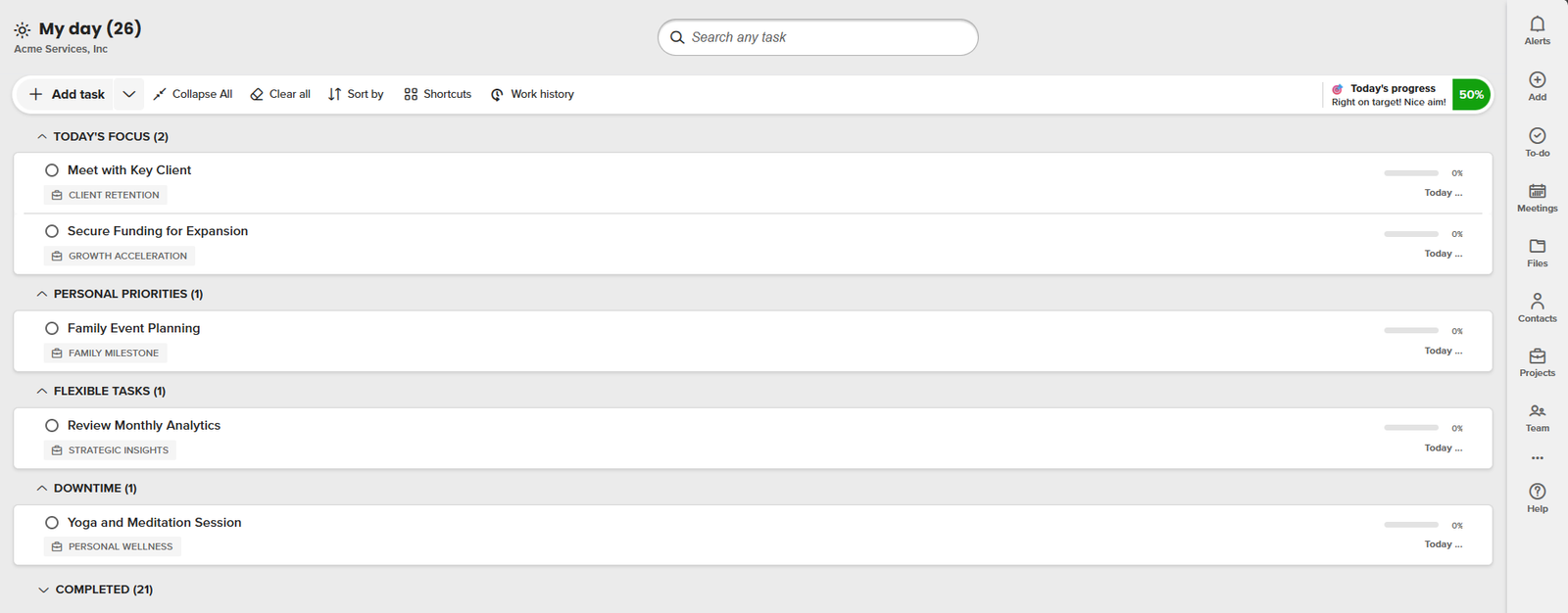
The “Today’s Focus” section in Trovve is a key feature for having a productive day. It helps you highlight the tasks that need your immediate attention—those essential items that, when done, have the most positive impact on your day and goals. By working on these first, you make sure that your most important work doesn’t get buried under less urgent tasks. 

To identify what counts as “Today’s Focus,” think about the importance and outcomes of each task. Ask yourself: Which tasks will advance my projects? What must be done today to prevent potential problems? These are your critical tasks. Putting them first not only improves your daily productivity but also creates a feeling of achievement and focus as you move through your day. 

daily schedule

 Secret 2: Utilize Custom Sections for Task Segmentation in Your Daily Schedule

One of the main advantages of Trovve is that it allows users to customize their daily schedule with different sections, which helps them organize and segment their tasks effectively. This feature lets you split your day into clear segments, each designed for various kinds of tasks or priorities. You can name them “Important,” “Normal,” or use the Eisenhower Matrix with categories like “Urgent” and “Schedule,” depending on what works best for you. These sections help you manage your workload with focus and intention. 

To make and use these custom sections, start by figuring out the types of tasks you do regularly. Then, sort them based on their urgency, importance, or the time of day when you’re most productive at doing them. This method not only helps in ranking tasks wisely but also ensures that every part of your day is consistent with your productivity goals. 

Daily Schedule

Secret 3: Tap into Pre-defined Section Ideas

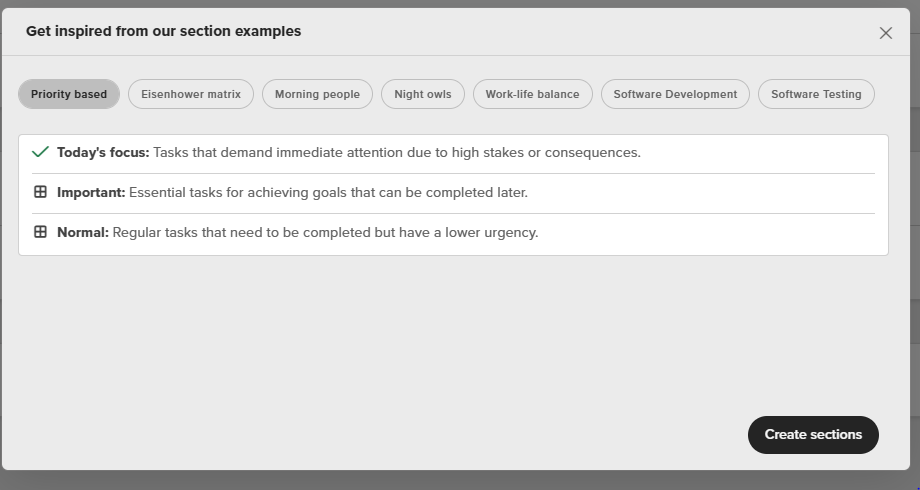
Those who want to improve their daily schedule without trial and error can benefit from Trovve’s “Get Ideas” feature. This tool gives a variety of pre-defined section ideas, allowing users to easily find and use the best organizational structures for their tasks. Whether they need to sort work by priority, type, or even time sensitivity, these templates offer a foundation that can be tailored to individual needs. 

Using these predefined ideas can make the task organization process much easier. It avoids the need to create everything from scratch, providing suggestions and practical solutions that match with proven productivity methods. By choosing and modifying these templates, users can quickly arrange their daily schedule, making sure that every task is put where it can be most efficiently handled and finished. 

Daily Schedule 

 Secret 4: Prioritize Tasks with the Eisenhower Matrix

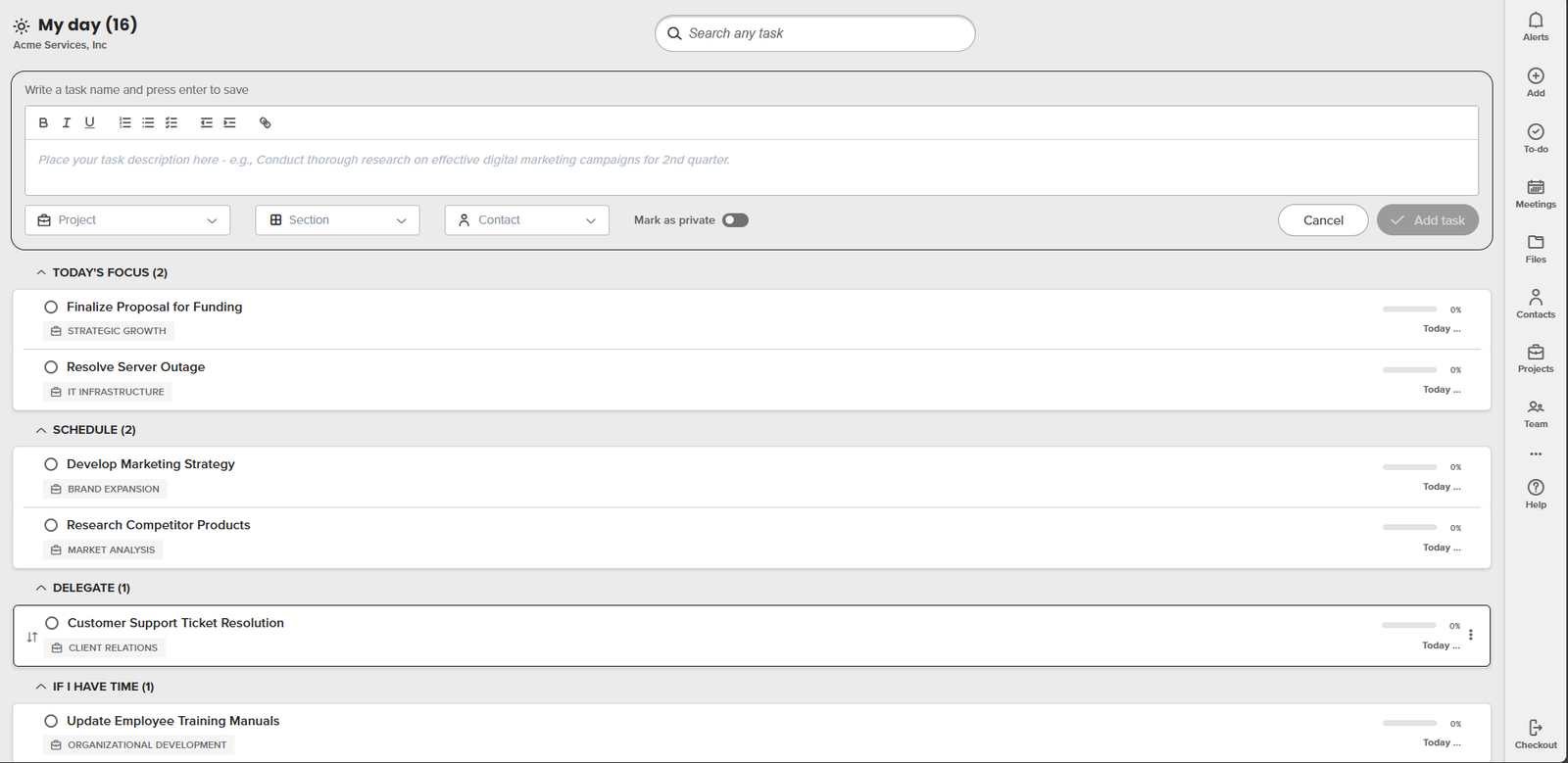
Using the Eisenhower Matrix, a timeless tool for task prioritization and effective time management, in your daily planning with Trovve can boost your productivity. This method categorizes tasks into four quadrants based on their urgency and importance: Urgent and Important, Not Urgent but Important, Urgent but Not Important, and Not Urgent and Not Important. In Trovve, you can create sections such as “Delegate” for Urgent but Not Important tasks and “If I Have Time” for those that are Neither Urgent nor Important. 

By applying the Eisenhower Matrix within Trovve, you make a visual and functional plan of your day’s tasks, helping you to concentrate on what is essential first. This structure avoids the common mistake of wasting too much time on less vital tasks and ensures that your energy is focused on activities that offer the most value for your efforts. 

Daily Schedule

 Secret 5: Adapt Your Daily Schedule to Your Energy Levels

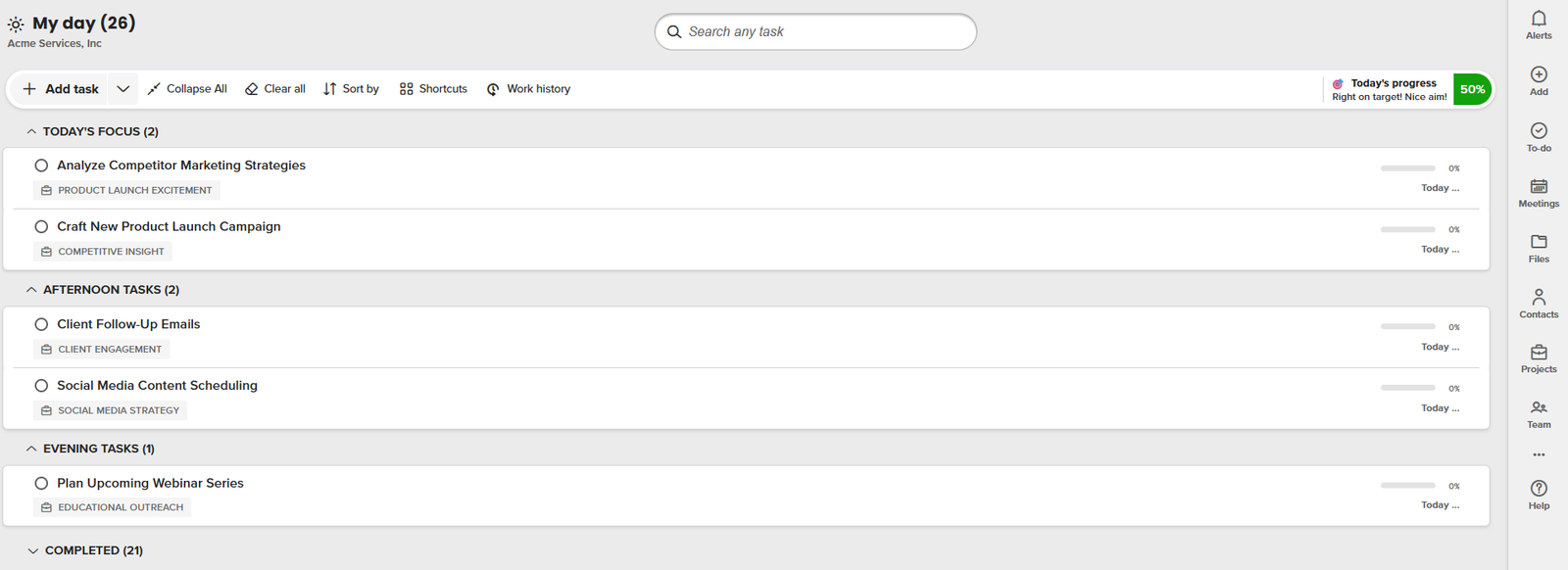
Your personal productivity peaks are key to optimizing your daily schedule. Trovve lets you customize your task list to match when you’re most alert and energetic—whether you’re a morning person or a night owl. This way, you do the right tasks at the right time, boosting your efficiency and effectiveness throughout the day. 

In Trovve, you can make sections like “Morning Tasks,” “Afternoon Tasks,” and “Evening Tasks.” Morning people can put their hardest or creative tasks in the “Morning Tasks” section to use their early energy boost. On the other hand, night owls might plan their intensive tasks under “Evening Tasks” to take advantage of their peak mental sharpness during later hours. This method not only improves task completion but also lowers fatigue by aligning your work with your natural rhythms. 

Secret 6: Balance Work and Personal Life in Your Daily Schedule

Work-life balance is a crucial element of a productive daily routine. Trovve helps you to combine both sides by letting you create sections like “Personal Priorities” and “Downtime.” This framework makes sure that you set aside time not only for work but also for rest and activities that refresh your mind. 

To handle this balance well, put your urgent work tasks in specific sections, and mix them with flexible tasks that belong to your “Personal Priorities.” This way, you keep up the pace in your work while also taking care of personal growth and relaxation. By assigning time slots in your daily routine to “Downtime,” you make sure that relaxation and personal care are not neglected but essential parts of your day. 

Secret 7: Regularly Review and Adapt Your Schedule

It is important to have a flexible and adaptable daily schedule that can respond to life’s unexpected changes. With Trovve, you can review and rearrange your sections and tasks regularly to keep your schedule coordinated with your changing priorities and needs. This practice keeps your routine from getting stale and helps you to improve your productivity constantly. 

To use this strategy effectively, make a regular time each week or day to check your current schedule. See what’s working and what needs to be changed. Move tasks between sections like “Today’s Focus” and “If I Have Time” based on new priorities or achieved goals. This continuous review and adaptation process makes sure that your daily schedule helps you reach your goals in the best way possible. 

Conclusion

Using Trovve’s features to make and manage custom sections changes your routine into a productivity breakthrough. You can shape your daily schedule with sections like “Today’s Focus,” “Personal Priorities,” and “Downtime” to match your tasks with your peak hours and personal goals. This customization makes every moment of your day effective, increasing your efficiency and satisfaction. 

We invite you to try out the different section types Trovve has. Find the combinations that fit your individual rhythm or team dynamics. Whether you’re a morning person who needs to focus on critical tasks or a night owl who juggles work and personal life, Trovve’s flexibility lets you create a daily schedule that works for you. 

Want to revolutionize your daily task management? Try Trovve and see for yourself how custom sections can help you work more efficiently and effectively. Whether you’re adapting your schedule to your energy levels or managing work and personal life, Trovve is made to suit your specific needs. 

We appreciate your feedback! Tell us what you think of the custom sections and suggestions feature. Your input helps us constantly refine and ensure that Trovve is an essential tool in your productivity toolkit. 

Best project management software for a 5-person software team

For small businesses, especially software teams with around five members, finding the right project management software is crucial—it can make a significant difference. With the right tools, teams can improve collaboration, simplify processes, and maximize productivity. This article reviews various choices for the best project management software for small business owners, giving a detailed analysis of popular platforms that suit the specific needs of smaller teams. From easy-to-use interfaces to robust integrations and different price points, we’ll show you the features and advantages of each software option, helping you choose wisely for your business. Whether you’re a new or a seasoned business looking to polish your project management method, knowing these tools will help you compare your options effectively. 

List of apps

  1. Trovve 
  2. Basecamp 
  3. Asana 
  4. Microsoft Planner 
  5. Monday.com 

Trovve

Trovve is the best project management software for small business owners who want to streamline their work, collaborate better, and achieve more. Trovve helps you plan, organize, and execute your projects with ease, integrating seamlessly with Microsoft 365 and providing a suite of solutions that cover every aspect of your work. Whether you need to manage tasks, files, contacts, teams, or meetings, Trovve has you covered with simple and intuitive features that boost your productivity and performance. Trovve is more than just a project management tool, it’s your all-in-one work management platform that empowers you to conquer your day with confidence. 

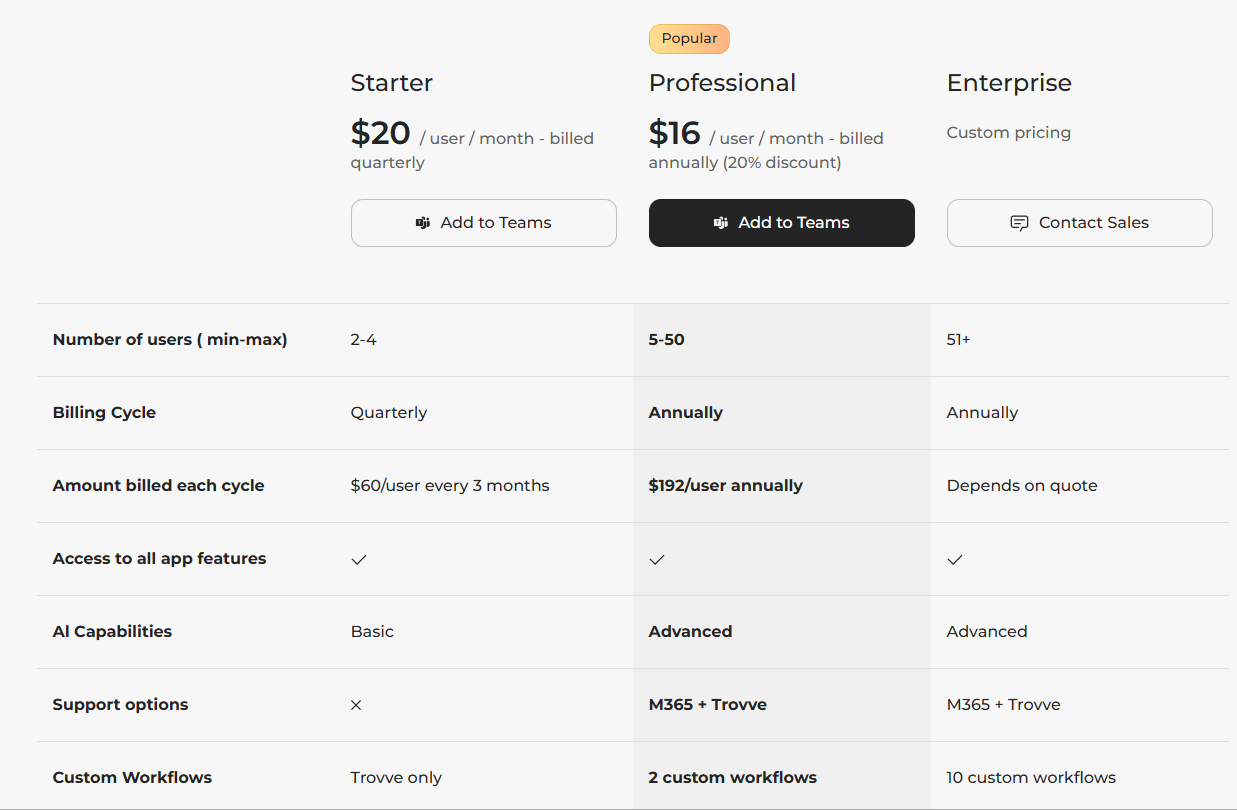
Pricing info

  1. Starter: $20/user/month
  2. Professional: $16/user/month
  3. Enterprise: Custom pricing

Basecamp

best project management software for small business

Basecamp is one of the best project management software for small business, especially for remote teams. It is a web-based platform that helps you organize your projects, communicate with your team, and keep track of your progress. You can create to-do lists, assign tasks, set deadlines, share files, chat, and give feedback, all in one place. Basecamp also integrates with many other tools, such as email, Google Drive, Dropbox, and Zapier. Basecamp has a simple and intuitive interface that makes it easy to use and customize according to your needs. You can also access Basecamp from any device, including desktop, mobile, and tablet. 

best project management software for small business


Pricing

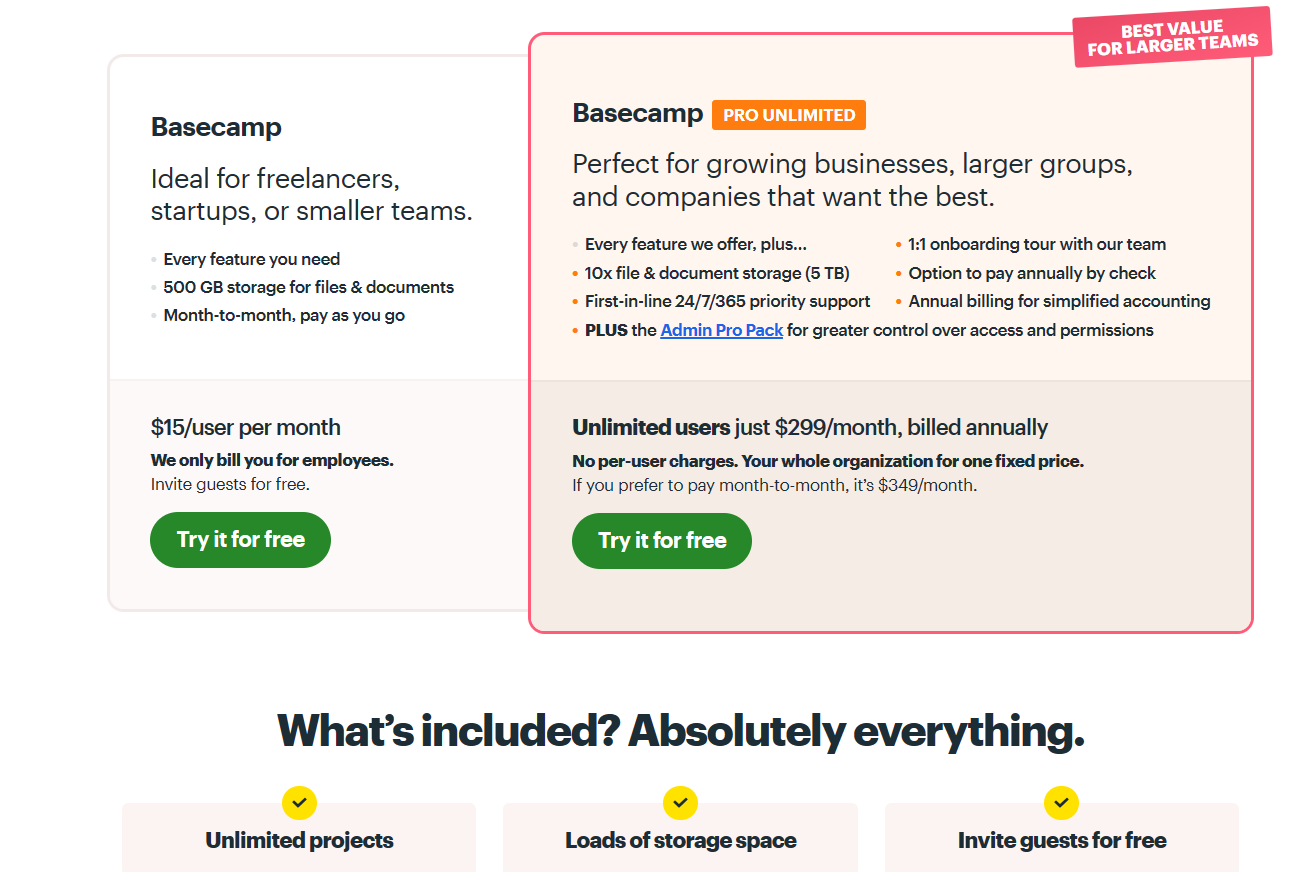
  1. Freelancers/startups/smaller teams: $15/user/month
  2. Basecamp Pro Unlimited: $299/month

Asana

Asana is a cloud-based project management software that helps teams coordinate and manage their work. It allows users to create projects, assign tasks, set deadlines, track progress, and collaborate with others. Asana also integrates with various tools and apps, such as Gmail, Slack, Dropbox, and Zoom, to streamline workflows and communication. Asana is one of the best project management software for small business. It is ideal for teams that need flexibility and customization in managing their projects, as it supports different views (list, board, timeline, calendar), custom fields, rules, templates, and reporting features. Asana also has a mobile app for iOS and Android devices, so users can access their projects anytime, anywhere. 

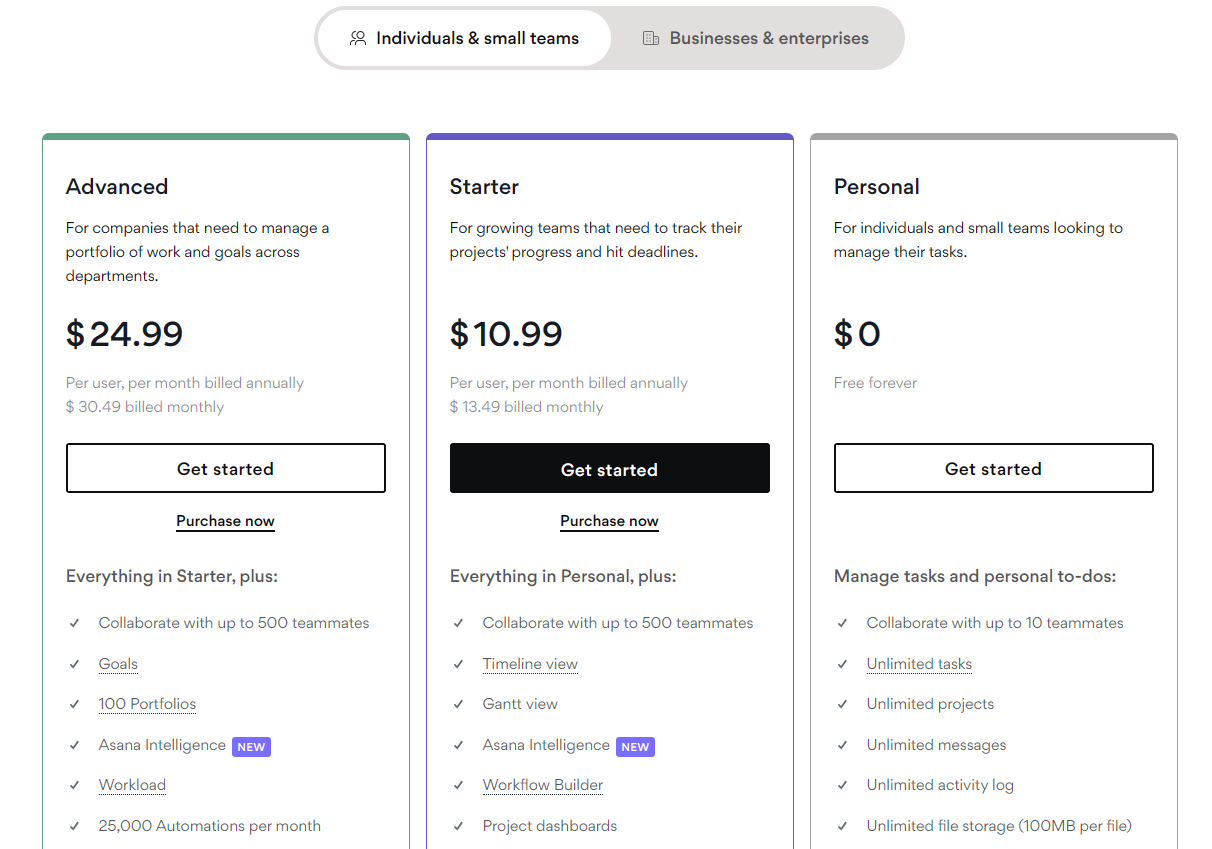
Pricing

  1. Personal: $0
  2. Starter: $10.99/user/month
  3. Advanced: $24.99/user/month

Microsoft Planner

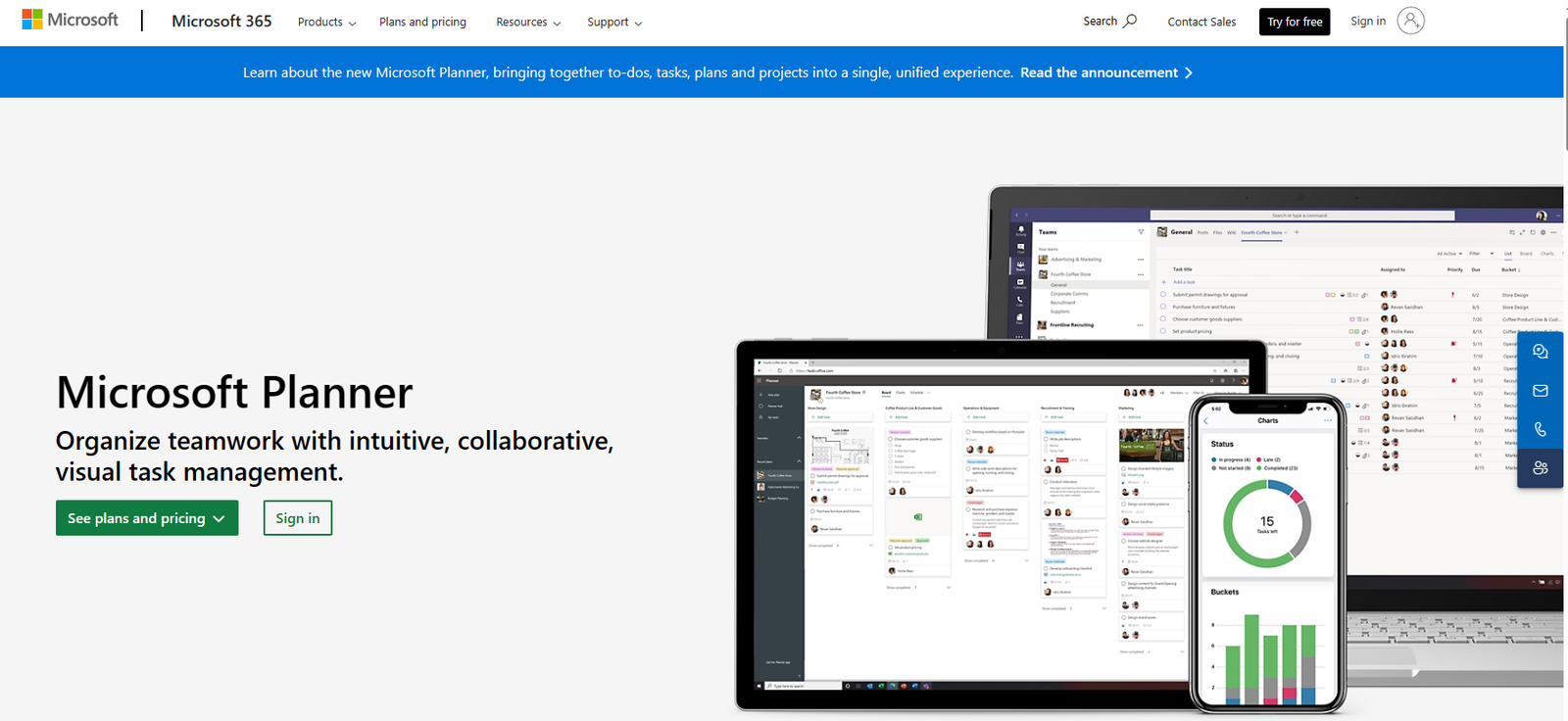
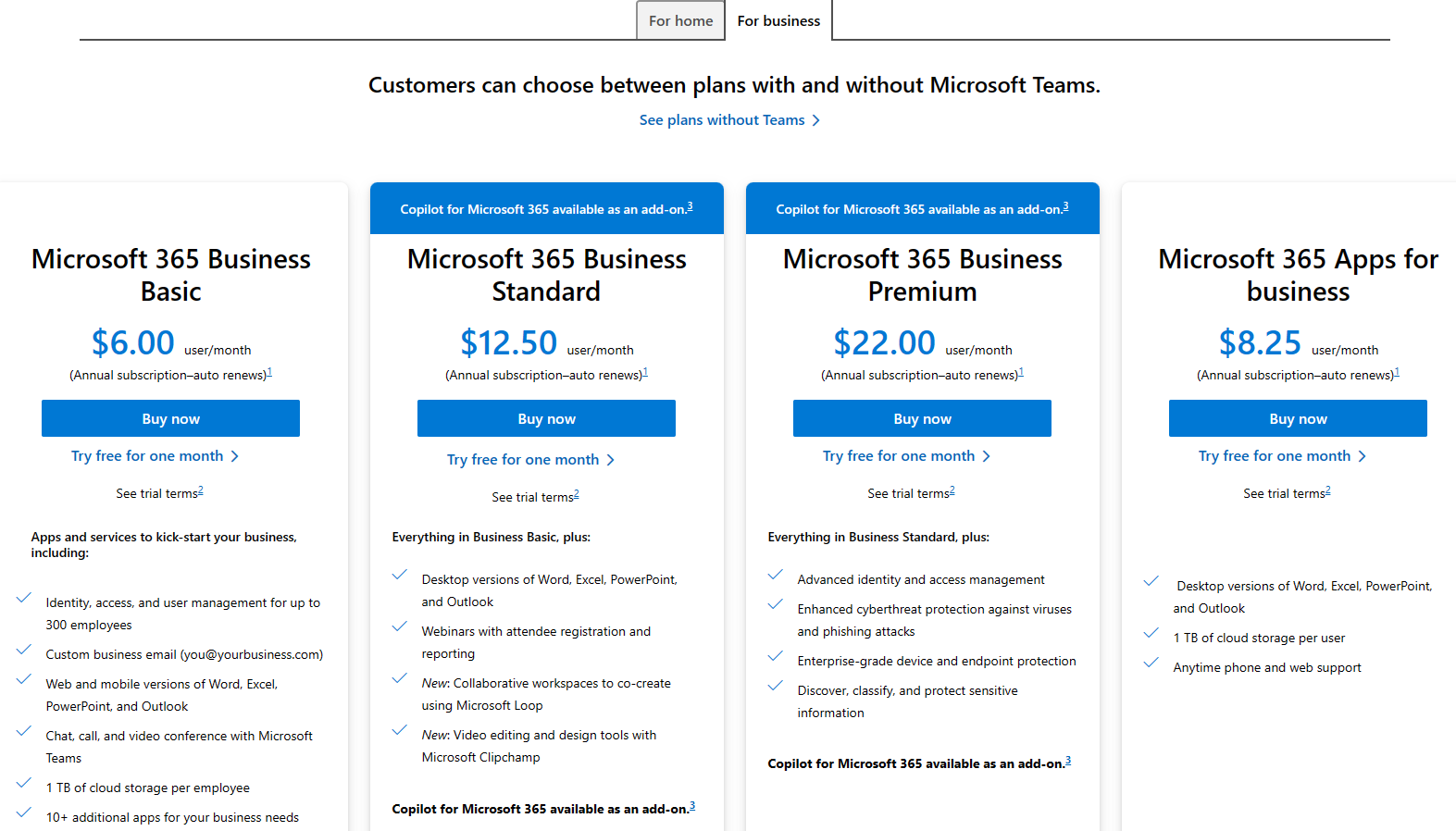
Microsoft Planner is a cloud-based project management app that allows you to create and assign tasks, organize, and track progress, share files and chat with team members. It is part of the Microsoft 365 suite of productivity tools and integrates with other apps like Outlook, Teams, SharePoint, and OneDrive. Microsoft Planner is designed to be simple and intuitive, with a visual interface that lets you drag and drop tasks into different buckets and boards. You can also view your tasks in a calendar or a chart to get an overview of your deadlines and workload. Microsoft Planner is one of the best project management software for small business, especially if you are already using Microsoft 365. It offers a low-cost and easy-to-use solution for managing projects and collaborating with your team. 

Pricing

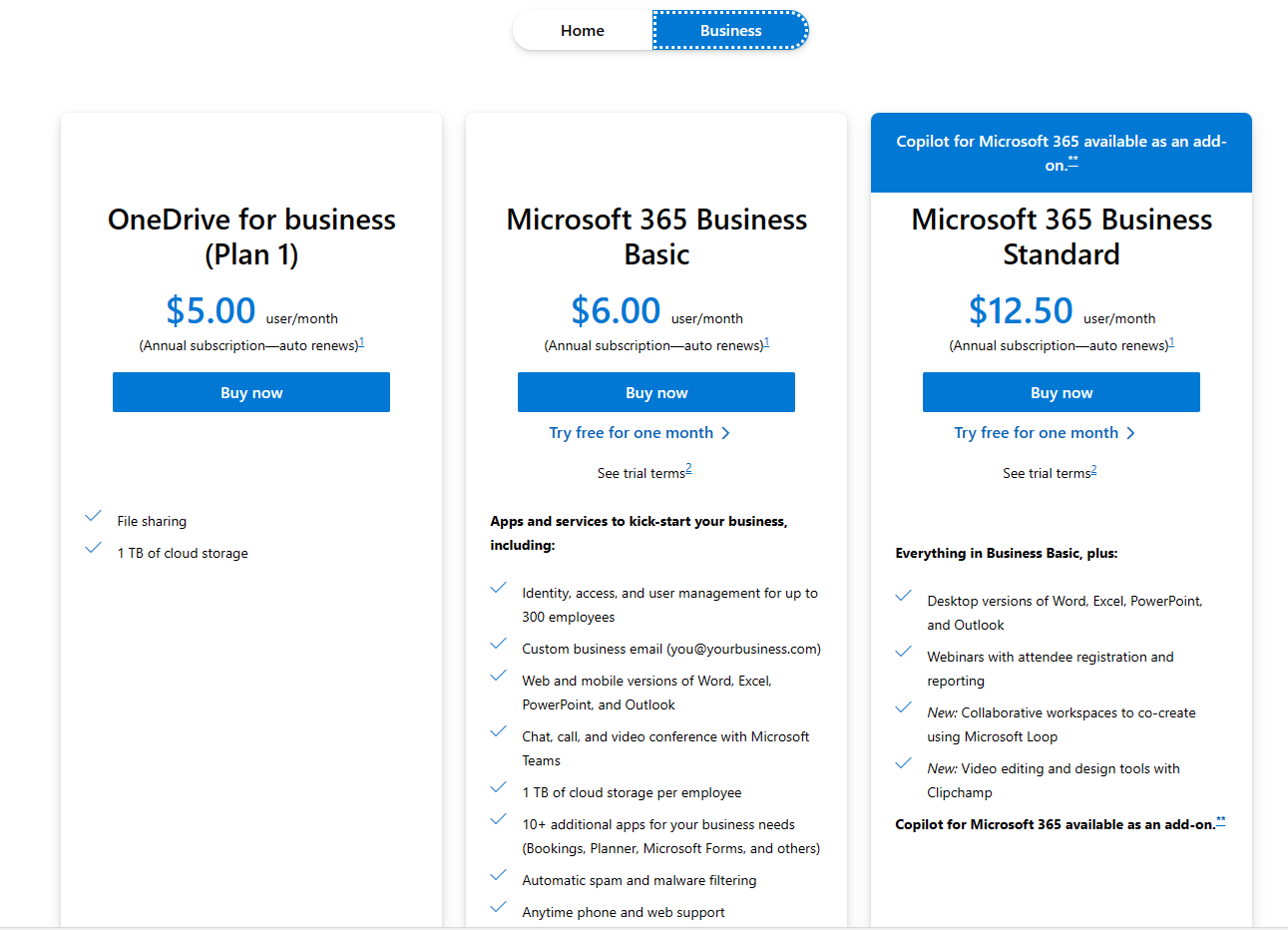
  1. M365 Business Basic: $6.00/user/month
  2. M365 Business Standard: $12.50/user/month
  3. M365 Business Premium: $22.00/user/month
  4. M365 Apps for business: $8.25/user/month

Monday.com

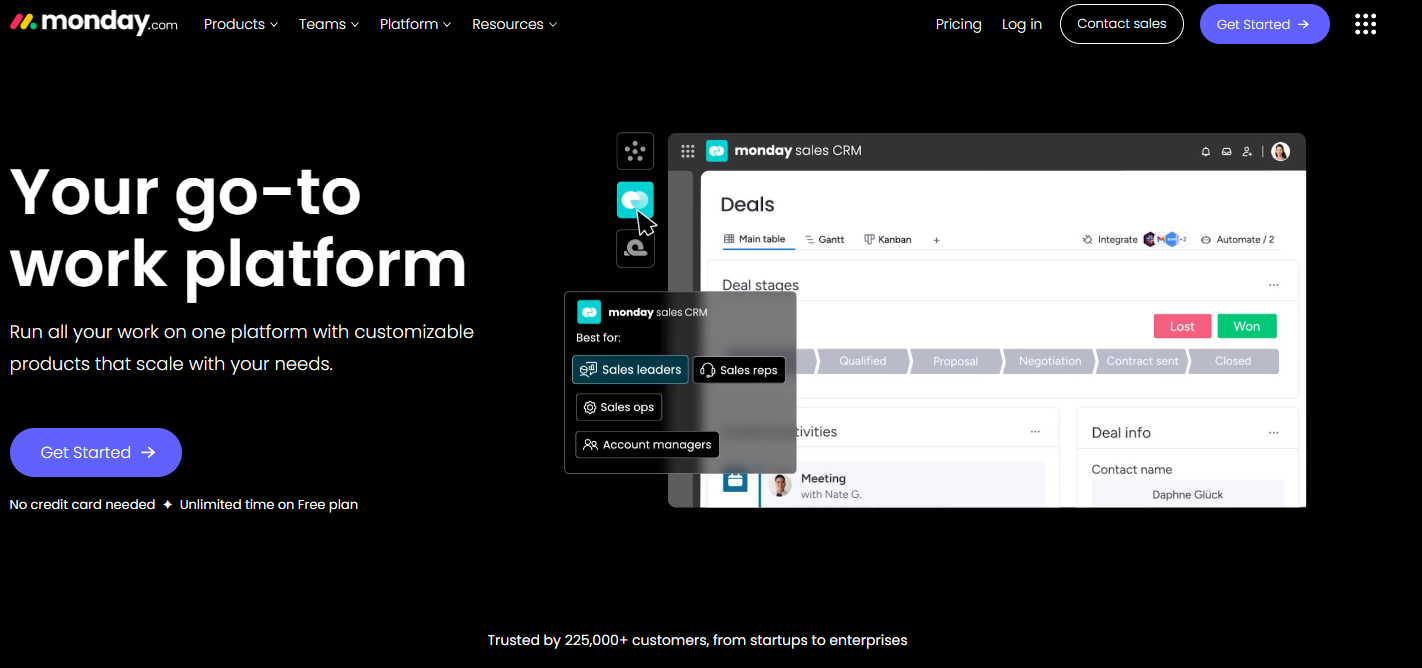
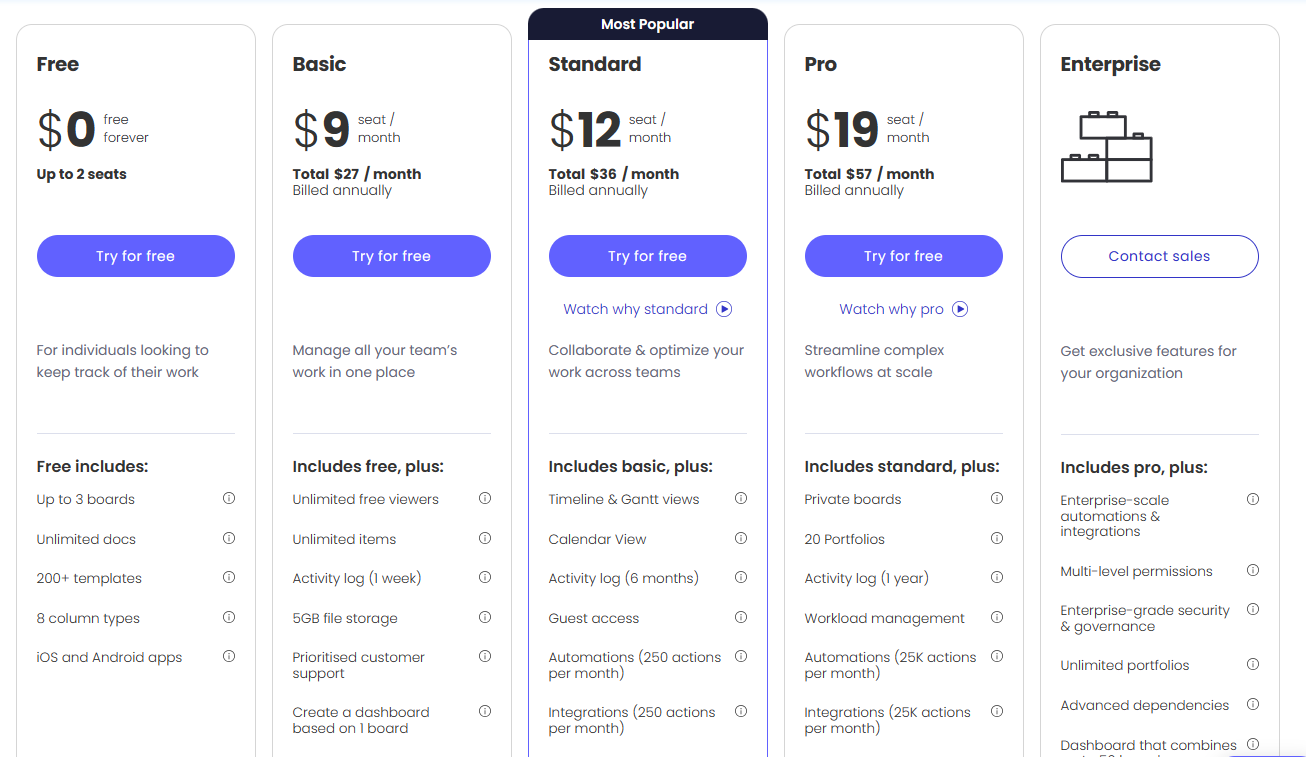
Monday.com is a cloud-based project management platform that helps teams collaborate, track progress, and achieve their goals. Monday.com is designed to be flexible and customizable, allowing users to create workflows that suit their specific needs. Users can choose from a variety of templates or create their own boards from scratch, and add different columns, views, automations, and integrations to streamline their work processes. Monday.com also offers several features that make it one of the best project management software for small business, such as: 

  • Time tracking: Users can track the time spent on each task, assign billable and non-billable hours, and generate reports and invoices. 
  • Budget management: Users can plan and manage their budgets, track expenses, and monitor the profitability of their projects. 
  • Resource management: Users can allocate resources, balance workloads, and identify bottlenecks and risks. 
  • Communication and collaboration: Users can communicate with their team members and stakeholders, share files and feedback, and sync with other tools like Gmail, Slack, Zoom, and more. 
  • Reporting and analytics: Users can visualize their data, create dashboards and charts, and measure their performance and KPIs. 

Monday.com is suitable for teams of any size and industry, but it is especially useful for small businesses that need a simple and intuitive project management tool that can scale with their growth.  

Pricing

  1. Up o 2 seats: $0
  2. Basic: $9/seat/month
  3. Standard: $12/seat/month
  4. Pro: $19/seat/month
  5. Enterprise: Contact sales

Conclusion

The evaluation of project management software for small teams, particularly a 5-person software team, reveals several viable options, each offering unique strengths suited to different business needs. Trovve stands out for its all-in-one capabilities and seamless integration with Microsoft 365, making it an excellent choice for those who prioritize a comprehensive toolset. Basecamp is noted for its effectiveness in supporting remote teams with its user-friendly interface and robust integration capabilities. Asana offers great flexibility and extensive customization options, ideal for teams requiring detailed project tracking and management. Microsoft Planner provides an integrated solution for teams already utilizing Microsoft 365, with a straightforward, visually oriented user interface. Finally, Monday.com offers a highly flexible and scalable tool, ideal for small businesses anticipating growth, with features supporting everything from time tracking to resource management.

Each platform is tailored to various aspects of project management, and the best choice will depend on specific business needs, existing software ecosystems, and budget considerations. For a 5-person team, the software should enhance collaboration, streamline task management, and adapt to the team’s workflow without overwhelming users with unnecessary features. Therefore, it’s essential to assess not only the functionality and integration capabilities of each software but also consider the learning curve and scalability to ensure it aligns with the team’s long-term goals.

FAQs

  1. What features should we consider when choosing project management software for a small team?
    Look for software that provides task management, collaboration tools, time tracking, and resource allocation. Integration with other tools your team uses daily (like email, calendar apps, and file-sharing platforms) is also crucial for streamlining workflows.
  2. Is it worth paying for premium features in project management software for a small team?
    This depends on your team’s specific needs. If advanced features like detailed reporting, custom workflows, or enhanced security are critical for your operations, investing in premium features can be worthwhile. However, for many small teams, basic or mid-tier plans provide sufficient functionality.
  3. Can free project management tools be effective for a small software team?
    Yes, many free tools offer substantial functionality suitable for small teams. Platforms like Asana and Monday.com offer free tiers that are often adequate for managing a small team’s projects. It’s important to review the limitations of free versions, such as the number of active projects or access to customer support.
  4. How do we decide between web-based project management tools and integrated software suites?
    If your team already uses a suite of tools from a specific vendor (like Microsoft 365), choosing a project management tool within the same ecosystem (like Microsoft Planner or Trovve) can enhance compatibility and reduce the learning curve. For teams seeking more flexibility or unique features, standalone web-based tools may be better.
  5. What are the signs that a project management tool is not the right fit for our team?
    If the tool complicates rather than simplifies your workflow, requires excessive training time, or lacks critical features necessary for your projects, it may not be the right fit. Other indicators include poor customer support, frequent downtime, and a pricing structure that doesn’t align with the value provided.
  6. How often should we re-evaluate our project management software choice?
    It’s wise to assess your software annually or bi-annually, especially as your team grows or your business needs evolve. New features, changes in software pricing, or shifts in your team’s workflow can also prompt a re-evaluation.
  7. Can we use multiple project management tools simultaneously?
    While possible, using multiple tools can lead to confusion and inefficiencies unless each tool serves a specific, well-defined purpose. Integration and data syncing issues might also arise. It’s more efficient to find one platform that meets all or most of your needs.


The Ultimate Product Launch Checklist: What Every Manager Needs to Know

Launching a product successfully is a monumental task that demands meticulous planning and execution. With the stark reality that 80% of new products fail, it’s crucial to arm yourself with a strategic product launch checklist to ensure your venture lands among the successful 20%. This blog post is tailored for managers and entrepreneurs seeking to navigate the intricacies of a product launch with precision. It distills the essence of strategic planning, audience understanding, product/market fit validation, goal setting, competitive analysis, stakeholder engagement, and effective storytelling into a concise guide. 

 By adhering to this streamlined checklist, you can elevate your product launch from a daunting challenge to a triumphant success. This guide acts as your playbook, offering a clear roadmap and actionable steps to not just launch a product, but to make it resonate with your target audience and stand out in a crowded market. Welcome to a transformative approach to product launches, designed to position your product for the recognition and success it deserves. 


Crafting Your Product Launch Checklist: Setting the Foundation

Understanding the Importance of Strategic Planning

Launching a product is a monumental task filled with intricacies. A staggering 80% of new products do not survive, highlighting the critical need for a comprehensive product launch checklist. Success lies not just in creating an outstanding product but also in developing an in-depth plan for its market introduction. This guide is tailored for product managers and entrepreneurs on the brink of launching a new venture, providing a detailed playbook to ensure a successful market debut.

Enhancing Participation in the Product Launch Process

For novices, beginning with tactical aspects, such as the product launch checklist, lays a solid groundwork. Those with more experience might opt to refine their strategy, focusing on areas like optimizing launch speed without compromising quality. Fully engaging with this all-encompassing guide, sharing insights with teammates, and connecting with peers can significantly improve strategic planning, offering a clearer route to success.

The Power of a Problem Statement

Central to any product launch is pinpointing the exact problem your product seeks to solve. A prime example of this principle in action is Netflix’s transformation from a DVD rental service to a streaming giant. Identifying the growing consumer demand for instant access to entertainment without the constraints of physical media, Netflix pivoted to its business model, revolutionizing how people consume content. Crafting a precise problem statement not only clarifies the issue at hand but also acts as a beacon throughout the product’s lifecycle. It is pivotal for aligning your team and informs all stages of strategy, planning, and execution.

Identifying Your Target Audience

The foundation of a successful product launch is a deep understanding of your potential customers and the most effective ways to reach them. The Jobs-to-Be-Done framework is crucial for moving beyond basic demographics to genuinely grasp the needs of your target market. This method, utilized by companies such as Spotify to capture the essence of personalizing music streaming services, focuses on the functional, emotional, and social jobs customers need to do. Presenting your product as the solution to these jobs, rather than a list of features, fosters a deeper connection with your audience and paves the way for a triumphant launch.

In subsequent sections, we will dive deeper into each component of the product launch checklist, equipping you with the necessary tools and insights to navigate the complexities of introducing a new product to the market.


Expanding Your Product Launch Checklist: From Validation to Competitive Edge

Perfecting Product/Market Fit Validation

A pivotal stage in the product launch checklist is ensuring your offering meets a genuine market need. A real-world example of effective validation is Dropbox’s use of a simple demo video to gauge interest before their broader market launch. By highlighting how their product solved a widespread problem—file sharing across multiple devices—they were able to generate significant pre-launch interest. Implementing a landing page to test various messages and collect feedback, much like Dropbox did, provides crucial insights that can fine-tune your strategy and messaging, ensuring your product resonates with its intended audience from day one.

Goal setting for Launch Success

The roadmap to a successful product launch is incomplete without clear, measurable goals. Take LinkedIn’s approach when launching new features; by setting specific user engagement targets, they could measure the impact and adoption rate, guiding further development and marketing efforts. Establishing a product launch goals document, where objectives across different business functions are clarified and aligned with overarching company ambitions, ensures every team member understands what success looks like and drives collective effort towards achieving these benchmarks.

Mastering Competitive Analysis

The last piece of the product launch checklist puzzle is conducting a thorough competitive analysis. An illustrious example of this in practice is Tesla’s entry into the electric vehicle market. By understanding the strengths and weaknesses of existing automotive players, Tesla positioned itself as a premium brand that combines sustainability with luxury and performance, distinguishing itself in a crowded marketplace. Identifying direct and indirect competitors, understanding their value proposition, and finding your unique selling proposition are crucial steps in carving out your competitive advantage. This strategic insight not only informs product development and marketing but also helps pinpoint what truly makes your product stand out, much like Tesla’s focus on innovation and user experience set it apart.


Enhancing Your Product Launch Checklist: Stakeholder Engagement and Team Leadership

Identifying Key Stakeholders

For a successful product launch, understanding who your stakeholders are is paramount. Beyond the immediate circle of customers, a wide array of internal stakeholders plays a critical role in the launch process. From executives who set the vision to the sales and marketing teams that communicate it, identifying these stakeholders early is crucial for a cohesive launch strategy. Engaging stakeholders effectively means not just informing them but actively involving them in the launch process, ensuring their support and mitigating potential obstacles.

Crafting a Strategic Communication Plan

Effective communication is the backbone of stakeholder engagement. Utilizing tools like the Mendelow’s Matrix can help prioritize stakeholder communication based on their power and interest in the project. This strategic approach ensures that critical stakeholders, such as department heads or key influencers within the organization, receive the attention and information they need. Conversely, it also identifies those who require minimal effort or need to be kept satisfied with regular updates. This tailored communication strategy prevents information overload and ensures stakeholders are engaged in a manner that respects their time and interest levels.

Building and Leading a Cross-functional Team

Assembling a product launch team is more than just gathering a group of individuals from different departments. It’s about creating a unified force with a shared goal. The team should represent all facets of the organization involved in the launch, from product development to legal, ensuring comprehensive coverage of all launch aspects. Leading this team requires clear ground rules, from decision-making protocols to meeting etiquette, ensuring everyone is aligned and contributing effectively. Setting clear, shared goals is essential, as it gives the team a common target and measures success in a tangible way.


Finalizing Your Product Launch Checklist: Strategic Planning and Execution

Engaging in Strategic Planning with SOAR

Incorporating the SOAR framework into your product launch checklist enriches strategic planning, ensuring a roadmap for success. This collaborative approach fosters alignment on strengths, opportunities, aspirations, and results. Imagine the constructive collaboration created when a company like Tesla leverages its electric vehicle technology and sustainability commitment to distinguish itself in a crowded automotive market. Identifying and leveraging unique strengths and market opportunities, much like Tesla’s emphasis on innovation and eco-friendliness, can carve out a competitive edge and set a clear direction for product launches.

Crafting a Comprehensive Product Launch Checklist

A thorough product launch checklist is like preparing a detailed plan before embarking on a complex project, like constructing a skyscraper. Every element, from foundational work to the finishing touches, must be meticulously planned and executed. This checklist includes everything from initial product testing, architectural blueprints, through marketing strategies, akin to the construction phase, to legal and compliance checks, like obtaining building permits. Tailoring this checklist to fit the specific needs of your product, as a construction project would adapt to local regulations and environments, ensures a comprehensive approach to launching successfully.

Developing a Practical Launch Plan

Transitioning from strategic planning to actionable steps, a well-defined product launch plan acts as the scaffolding for your project. Utilizing tools like the provided Excel template or platforms such as Trello for task assignment and progress tracking can make complex launches manageable. For example, organizing a global marketing campaign for a new smartphone model involves intricate coordination of various tasks, from digital advertising to in-store promotions, akin to the orchestrated effort in launching a new software update across multiple platforms. Incorporating visual tools like Gantt charts clarifies timelines and progress, like how project managers in the tech industry visualize software development cycles. This structured approach, bolstered by efficient communication and stakeholder engagement, ensures the successful transformation of innovative concepts into market-ready products.


Accelerating Towards Success: Balancing Speed and Quality in Product Launches

The essence of balancing speed with quality in product launches can be epitomized by Facebook’s motto in its early years, “Move fast and break things.” This philosophy emphasizes the importance of quick market entry but also underlines the necessity of not compromising on the integrity and reliability of the product. To achieve this equilibrium, consider these strategic approaches:

Prioritizing Impactful Tasks

Strategically prioritize tasks that directly influence your key business objectives. For instance, when Spotify launched in new markets, it focused on securing licensing agreements and cultivating local music content, understanding that these elements were critical to their service’s value proposition. This strategic prioritization ensured that efforts were concentrated on areas that would significantly impact user acquisition and satisfaction, even if it meant delaying other less critical features.

Setting Realistic Timelines

Developing realistic timelines requires a comprehensive understanding of the tasks at hand and the resources available. For example, when Apple plans the launch of a new iPhone, it meticulously maps out the timeline for each phase of the product’s development, from initial design to final testing, considering the need for high quality and innovation. This methodical approach ensures that the product launch is not rushed at the expense of product quality or delayed unnecessarily, striking the perfect balance between speed and meticulousness.


Mastering the Art of Product Management with Essential Tools

Essential Toolkit for Product Leaders

Navigating the complexities of a product launch necessitates a robust toolkit. Project management platforms like Jira, Monday.com or Trovve facilitate seamless coordination across different teams, ensuring that tasks are completed on schedule. Marketing automation tools, like those used by HubSpot, enable efficient targeting and engagement of potential customers, optimizing the marketing strategy without manual effort. Additionally, CRM systems like Salesforce play a crucial role in maintaining customer relationships, offering insights that can inform and refine the product strategy.

The Power of Storytelling in Product Launches

High-quality product storytelling captivates and connects with your audience on a deeper level. Take, for example, the storytelling approach of Warby Parker, which narrates the journey of offering affordable, stylish eyewear while highlighting their Buy a Pair, Give a Pair program. This narrative doesn’t just sell eyeglasses; it tells a story of social impact, directly engaging consumers’ emotions and fostering a strong brand connection. Engaging storytelling is about weaving your product’s unique value into a narrative that resonates with your audience, compelling them to become part of your story.


A Guide to Exponential Success Through Growth Hacking

Growth hacking presents a lucrative pathway for achieving rapid market adoption without the hefty marketing expenditures typically associated with traditional strategies. This low-cost, innovative approach to marketing focuses on the scalability of various marketing tactics. By following the AAARRR model, companies can effectively utilize growth hacking techniques for their product launches.

The AAARRR Model Explained

  • Awareness: The first step involves making your product known to your potential market. A case in point is Spotify’s use of personalized playlists to draw attention. By creating features like “Discover Weekly,” Spotify not only increased awareness but also personalized the user experience, leading to a substantial boost in user engagement.
  • Acquisition: This phase turns your audience into customers. An illustrative example is Instagram’s integration with Facebook, allowing users to seamlessly share their Instagram posts on Facebook, thereby driving up new user sign-ups through increased visibility.
  • Activation: Activation aims to prompt an initial action from consumers. An excellent example is Canva’s interactive design tutorials for inexperienced users, engaging them immediately and demonstrating the value of the platform right from the start.
  • Retention: Keeping customers coming back is crucial. Netflix excels in this by using viewing history to recommend new shows and movies, thus increasing the likelihood of users returning to the platform.
  • Revenue: This stage focuses on increasing the income from your customers. An example of a successful revenue growth hack is when Adobe shifted from selling physical software to a subscription-based model for its Creative Cloud services, significantly boosting its recurring revenue.
  • Referral: Finally, encouraging customers to refer your product to others can lead to exponential growth. PayPal’s referral program, which offered cash incentives for both the referrer and the referred, rapidly expanded their user base.

How to Connect with Your Market Through Social Media

Social media is essential for any product launch in today’s digital world. It allows brands to reach out to both prospective and current customers directly, and to have genuine interactions and establish long-term bonds.

  • Understanding Your Audience: The first step is to know where your audience spends their time online. For instance, LinkedIn has become an invaluable platform for B2B companies to connect with industry professionals and decision-makers. 
  • Engaging Content: Engaging your audience requires content that resonates with them. GoPro’s user-generated content strategy leverages thrilling videos from its users, highlighting the camera’s capabilities while engaging its adventurous customer base. 
  • Shareability: Ensuring your content is shareable is key to virality. Red Bull’s stratosphere jump was not only a testament to the brand’s adventurous spirit but also produced content that was widely shared across social media, significantly enhancing brand visibility. 
  • The Secrets to Successful Product Marketing Videos

Video content has emerged as a powerful tool for engaging customers, offering a dynamic way to highlight your product’s features and benefits.

  • Concise and Compelling Storytelling: Your video should immediately capture the viewer’s attention. Dropbox’s simple explainer video, which clearly communicated its value proposition, is a prime example of effective storytelling that contributed to its viral spread.
  • SEO-Optimized Titles: Your video titles should be both catchy and search-friendly. Buzzfeed’s Tasty videos often use titles that are optimized for search engines and social shares, contributing to their widespread visibility.
  • Appropriate Length: The length of your video should correspond to your product’s complexity and the medium. TED Talks, known for their engaging 18-minute presentations, prove that longer content can be incredibly effective if it delivers value to the audience.

Leveraging these growth hacking strategies, social media engagement techniques, and video marketing rules can increase the success rate of your product launches, allowing you to achieve exponential growth without proportional increases in your marketing budget.


Incorporating Influencer Marketing into Your Product Launch Checklist

Nowadays, when consumers face a lot of ads online, the usual marketing tactics often don’t work. The smart solution? Influencer marketing. This strategy relies on using people with large online audiences—people whose views and recommendations can influence their audience’s buying choices. Unlike celebrities, influencers may have built their following through knowledge in a specific area, relevant content, or just an attractive online personality. This range of influencers gives brands a special chance to genuinely reach out to various kinds of consumers.

Implementing Influencer Marketing: A Real-World Strategy

Imagine a tech startup introducing an innovative smart home device. Rather than relying solely on conventional advertising, the company partners with influencers in the tech and lifestyle sectors, focusing on those known for their insightful gadget reviews. This approach not only amplifies the product’s visibility but also lends it credibility and an individualized touch that traditional advertisements lack.

A standout example involves a beauty brand launching a new eco-friendly skincare line. Collaborating with influencers passionate about sustainable living, the brand facilitates genuine conversations around the product, emphasizing its environmental benefits and ethical considerations. Such partnerships not only enhance brand awareness but also forge a deeper connection with consumers who value sustainability, driving both engagement and conversions.

Crafting Engaging Case Studies to Build Credibility

Beyond influencer marketing, compelling case studies serve as another cornerstone for building product credibility. These narratives, detailing real-world applications and benefits of a product, provide tangible proof of its value. For instance, a SaaS company might highlight how its software revolutionized workflow management for a small business, highlighting the tangible productivity gains and positive feedback from the business’s team.

Effective case studies often feature direct quotes from satisfied customers, lending a voice to the success stories and making them more relatable. These testimonials can be particularly persuasive when they address common hesitations potential customers might have, providing reassurance and tipping the scales towards a purchase.

Continuous Growth Post-Launch

The journey doesn’t end with the launch. Engaging early adopters, monitoring social media conversations, and soliciting customer reviews are crucial steps for sustained growth. For example, a newly launched fitness app might engage its initial users to understand their motivations and gather feedback, using this insight to iterate on the product and tailor marketing messages. Similarly, actively responding to social media discussions and encouraging satisfied customers to leave reviews can significantly enhance the product’s online presence and reputation.

Enhancing Future Launches: The Role of a Product Launch Retrospective

Conducting a product launch retrospective is a pivotal step in refining your product launch checklist for future endeavors. This process involves analyzing both the triumphs and hurdles encountered during the launch phase to garner valuable insights for improvement. Unlike traditional reviews, a retrospective is not about attributing blame but fostering a constructive dialogue aimed at enhancing internal workflows and elevating customer satisfaction in subsequent launches.

Initiating with a pre-meeting questionnaire focusing on the workflow aspects of the launch, stakeholders are encouraged to reflect on what aspects were most effective, which strategies fell short, and what could be approached differently next time. This prelude ensures a productive and focused discussion during the retrospective meeting, guided by a clear agenda that promotes a positive and forward-looking atmosphere.

Conclusion

This article is a comprehensive guide for managers and entrepreneurs who want to have a successful product launch, emphasizing the importance of careful planning and execution in a market where 80% of new products fail. It provides a strategic checklist that includes knowing the target audience, validating product/market fit, setting measurable goals, doing competitive analysis, and engaging stakeholders effectively. It emphasizes the importance of problem-solving, audience understanding, and using strategic tools and frameworks such as SOAR and the AAARRR model for growth hacking. Moreover, it stresses the role of storytelling, influencer marketing, and continuous engagement post-launch to build credibility and sustain growth. By following this detailed roadmap, managers can improve their product’s market entry and significantly increase its chances of success, making the difficult task of a product launch into a strategic and achievable goal.

FAQs

(1) What is the significance of a product launch checklist?
A product launch checklist is crucial for ensuring a structured and strategic approach to introducing a new product to the market. It helps managers and entrepreneurs mitigate risks, align their team’s efforts, and increase the chances of their product landing among the 20% that succeed by covering essential aspects such as audience understanding, product/market fit, goal setting, and competitive analysis.

(2) How can one validate product/market fit before a product launch?
Validating product/market fit involves confirming that your product meets a genuine market need. This can be achieved through strategies such as using a demo video to gauge interest, creating a landing page to collect feedback, and implementing the Jobs-to-Be-Done framework to deeply understand the needs and tasks of your target market.

(3) Why is competitive analysis important in the product launch process?
Conducting a thorough competitive analysis helps in understanding the strengths and weaknesses of existing market players, identifying your product’s unique selling proposition, and positioning it effectively against competitors. This insight is invaluable for differentiating your product and crafting a marketing strategy that highlights its unique benefits.

(4) Can you explain the role of storytelling in product launches?
Storytelling plays a pivotal role in connecting with the audience on an emotional level, making your product more relatable and engaging. It involves weaving your product’s features and benefits into a compelling narrative that resonates with potential customers, thereby enhancing brand connection and encouraging them to become part of your story.

(5) What is growth hacking, and how can it benefit a product launch?
Growth hacking is an innovative marketing strategy focused on rapid market adoption through scalable and cost-effective tactics. By employing the AAARRR model (Awareness, Acquisition, Activation, Retention, Revenue, Referral), companies can leverage growth hacking techniques to increase visibility, user engagement, and revenue without the substantial marketing expenditures typically associated with traditional strategies.


The 8 Cheapest Cloud Storage Services and How to Decide [updated for 2024]

Data storage has become a crucial aspect of our lives. Whether it’s for personal use or for business purposes, having a reliable and affordable cloud storage service is essential. One of the most significant benefits of using affordable cloud storage services is saving money. You get ample storage for your videos, photos, documents, or anything else while keeping the price low. Unlike SSDs, whose prices have skyrocketed to insane values in recent years, cloud storage remains generally inexpensive, making it a smart financial choice.

With so many options available, it can be overwhelming to choose the right one for your needs. That’s why we have compiled a list of the 8 cheapest cloud storage services, along with a guide on how to decide which one is best for you.

In this blog post, we will take a closer look at the top 8 cloud storage services that offer the most bang for your buck. We will explore popular options such as OneDrive, Google Drive, Dropbox, iCloud, Box, Amazon Drive, Mega, and pCloud. Each service will be examined in terms of its features and pricing, helping you make an informed decision.

But it’s not just about the cost. We understand that choosing a cloud storage service goes beyond the price tag. That’s why we will also discuss key factors to consider when making your decision:

  • Evaluating your storage needs
  • Assessing your budget
  • Considering the user interface and accessibility
  • Checking for security features
  • Looking at additional features that may enhance your experience

Additionally, we will provide you with some valuable tips on how to make the most of your cloud storage service. You’ll learn how to maximize your free storage space, understand the importance of regular backups, utilize cloud storage for collaboration purposes, and protect your valuable data from potential threats.

By understanding both the cost-effective nature and the diverse features of these services, you can choose a cloud storage solution that not only fits your budget but also meets your personal or business needs.

So, if you’re in search of an affordable cloud storage solution that meets your requirements, look no further. Join us as we explore the 8 cheapest cloud storage services and guide you on how to decide which one is the perfect fit for you. 


List of apps

OneDrive

Google Drive

Dropbox

iCloud

Box

Amazon Drive

Mega

pCloud


OneDrive

OneDrive Home Page

OneDrive is Microsoft’s cloud storage service that lets you store and access your files from anywhere. You can use OneDrive to back up your photos, documents, music, and other important data, as well as sync them across your devices. You can also share files and folders with others, collaborate on Office documents online, and access your files offline.

OneDrive offers two types of plans: personal and business. OneDrive personal plans are designed for individual users who want to store their personal files in the cloud.

OneDrive for business plans is designed for organizations that want to store and manage their work files in the cloud, and it is one of the cheapest cloud storage services available. OneDrive for business plans comes with 1 TB of storage per user, or unlimited storage for plans with five or more users. OneDrive for business plans also include advanced security, compliance, and administration features, as well as Microsoft 365 apps for business.

One of the challenges of using OneDrive for file management is finding the right files quickly and easily. Sometimes you may have too many files scattered across different folders, or you may not remember where you saved a specific file. That’s why you need Trovve, the ultimate file management app that works seamlessly with OneDrive and SharePoint. Trovve helps you organize, access, and manage your files in a smart and effortless way. Here are some of the features that make Trovve stand out from other file management apps:

  1. Custom categories: You can create your own categories to group your files according to your needs. For example, you can create a category for marketing materials, another one for sales reports, and so on. You can also adjust the visibility settings of each category, so you can control who can see and access your files.
  2. Team drive: You can share your files and folders with your team members and collaborate on them online. You can also add web links, OneDrive files, and SharePoint files to your team drive, and access them all from one place. No more switching between different apps or tabs.
  3. Personal shortcuts: You can create shortcuts to your frequently used files and folders and access them from anywhere in Trovve. You can also add files to your personal to-do list and link them to tasks or projects. This way, you can streamline your workflow and stay on top of your priorities.
  4. Enhanced search and sorting: You can use keywords to search for files, folders, and links across your team drive and personal drive. You can also sort your content by type and category and find what you need in seconds. No more wasting time looking for the right file.

Trovve is the perfect companion for OneDrive users who want to take their file management to the next level, especially when looking for the cheapest cloud storage services. By using Trovve, you can enjoy the benefits of storing your files in the cloud, while also having a powerful and intuitive tool to organize and access them. Plus, Trovve integrates with Microsoft 365 apps, so you can edit and create documents online, without leaving the app. Ready to try Trovve for yourself? Book a demo today and see how it can transform your file management experience!


Pricing

OneDrive Pricing Page
  1. OneDrive for business (Plan 1) – ($5.00 user / month)
  2. Microsoft 365 Business Basic ($6.00 user / month)
  3. Microsoft 365 Business Standard ($12.50 user / month)


Google Drive

Google Drive Home Pg

Google Drive, one of the cheapest cloud storage services, is a comprehensive cloud storage and collaboration platform designed to facilitate easy and secure access to content from various devices, including mobile devices, tablets, and computers. It offers robust built-in protections against malware, spam, and ransomware, ensuring that your files are encrypted and secure. The platform is proactive in scanning and removing files shared with you that may contain malware, spam, ransomware, or phishing threats. Being cloud-native, Google Drive eliminates the need for local file storage, reducing the risk to your devices.

Google Drive is not just about storage; it’s also a powerful collaboration tool. It seamlessly integrates with Google’s suite of collaboration apps: Docs, Sheets, and Slides. These cloud-native apps allow teams to create content and collaborate in real-time, significantly enhancing productivity and teamwork. Moreover, Drive is designed to work well with the tools and apps your team is already using. This includes compatibility with Microsoft Office files, allowing users to collaborate without converting file formats, and support for over 100 additional file types, such as PDFs, CAD files, images, and more.

At the heart of Google Drive’s efficiency and user-friendliness is Google’s Search and AI technology. This technology not only provides fast and reliable search capabilities but also fosters collaboration. Features like Drive search chips further refine this experience by surfacing more relevant search results quickly, helping your team find the files they need without delay. Overall, Google Drive stands out as a cloud storage and collaboration platform that prioritizes security, integration, and efficiency, making it a valuable tool for individuals and teams alike.


Pricing

Google Drive Pricing Pg
  1. For Personal (no cost) 15 GB per user
  2. Business Standard ($12 per user / month, 1 year commitment 2 TB per user
  3. For those who require additional storage, Google Drive offers affordable plans starting at just $1.99 per month for 100 GB.
  4. They also provide larger storage options, such as 200 GB, 2 TB, 10 TB, 20 TB, and 30 TB, at competitive prices. For more information visit them here.


Dropbox

Dropbox Home Pg

The Dropbox app is a comprehensive cloud storage solution that offers a range of features to store, protect, and manage files effectively. It caters to both individual users and teams, providing ample storage options along with advanced security features. These features include file recovery, password protection, watermarking, and viewer history to ensure your data remains secure and within your control.

Dropbox emphasizes control and transparency in sharing content. It enables users to create trackable links to monitor when and how shared files are accessed, allowing for detailed engagement insights. Access to these files can be easily managed, with the option to revoke access to any individual at any time without impacting the permissions of others.

Collaboration is another key aspect of the Dropbox app, offering direct editing capabilities for PDFs and incorporating video tools to simplify the feedback and approval processes. These streamlines work on shared documents and enhances team productivity.

For businesses, Dropbox introduces automation tools to simplify manual processes. One such tool is the eSignature templates feature, which allows for the quick reuse of documents, saving time and resources in document management.

A standout feature of Dropbox is Dropbox Dash, an AI-powered universal search tool designed to enhance efficiency and ease of use. Dash is not limited to searching within Dropbox; it extends its capabilities to other favorite apps, emails, and more, enabling users to find content across platforms in seconds. This feature exemplifies Dropbox’s commitment to creating a user-friendly, integrated digital workspace.

Pricing


Dropbox Pricing pg
  1. Plus –for personal use ($9.99 / month / 1 user)
  2. Essentials – for professionals ($18 / month / 1 user)
  3. Business – for teams ($18 / month / per user
  4. Business Plus – ($26 / user / month)


iCloud

iCloud Home Page


iCloud is a cloud storage service offered by Apple that works seamlessly with its devices and operating systems. iCloud allows users to store, sync, and access their photos, videos, documents, music, contacts, calendars, and more across all their Apple devices. Users can also share files and folders with others, collaborate on projects, and locate their lost devices using iCloud.

Pricing

iCloud Pricing Pg


  1. Free storage (5 GB / each Apple ID) and users can upgrade to 50 GB, 200 GB, or 2 TB plans for $0.99, $2.99, or $9.99 per month, respectively.
  2. The 200 GB and 2 TB plans can also be shared with up to five family members. iCloud is compatible with iPhone, iPad, iPod touch, Mac, Apple TV, and Windows PC.


Box

Box home Pg

Box is a cloud storage service that offers secure and collaborative features for individuals and businesses. Box lets you store, access, and share your files from any device, anywhere. You can also edit documents, comment on files, and create workflows with your team members. Box, one of the cheapest cloud storage services, integrates with popular apps like Microsoft Office, Google Workspace, Slack, Zoom, and more.

Pricing

Box pricing Pg


  1. Business ($20 /user / month)
  2. Business plus ($30 / user / month)
  3. Enterprise ($35 / user / month)
  4. Enterprise plus (Custom) (Contact them)


Amazon Drive

Amazon drive home pg

Amazon is one of the leading providers of cloud computing services, offering a wide range of solutions for businesses and individuals. One of these solutions is Amazon Drive, a cloud storage service that allows users to store, sync, share, and access their files from any device. Amazon Drive is compatible with Windows, Mac, Android, iOS, and Fire devices, and has a web interface that can be accessed from any browser. Users can upload files and folders using drag-and-drop or use the desktop and mobile apps to sync their files automatically. Users can also create albums and share their photos and videos with others through links or email invitations. Amazon Drive supports file versioning, which means users can restore previous versions of their files up to 30 days. Users can also download their files for offline access and delete them securely from their devices.

Amazon Drive is a good option for users who are looking for a simple and reliable cloud storage service, especially if they are already using other Amazon services or have a Prime membership. However, Amazon Drive does not offer some advanced features that other cloud storage services have, such as encryption, collaboration, backup, or integration with third-party apps. Users who need more functionality and security may want to look for other alternatives.


Pricing

Amazon drive pricing pg
  1. Free storage for 5 GB (for anyone with an Amazon account)
  2. Additional storage plans that start from $1.99 / month for 100 GB.
  3. Users can also get unlimited photo storage and 5 GB of video storage with an Amazon Prime membership.


Mega

Mega Home Page

Mega, one of the cheapest cloud storage services, is a cloud storage service that offers end-to-end encryption and generous free storage. Additionally, Mega has a mobile app and a desktop sync client that allow users to access their files from any device. Mega claims to respect user privacy and does not scan or sell user data.

Pricing

  1. Users can get 50 GB of storage for free.
  2. Upgrade to more plans with up to 16 TB of storage.

What Sets MEGA Apart

MEGA stands out with its robust security features, offering end-to-end encryption which ensures user data remains private and secure. This level of security is complemented by a user-friendly interface that makes file management a breeze.

Flexible Plans

  • Pro Lite Plan: At just $55 annually, this plan offers 400 GB of storage along with 12 TB of transfer, making it an excellent budget-friendly option.
  • Pro I Plan: For those needing more space, this plan provides 2 TB of storage and 24 TB of transfer for approximately $110 annually.

User Experience

MEGA’s clean and responsive web interface enhances the overall user experience, providing seamless access whether you’re on a desktop or mobile device. The mobile applications mirror this efficiency, ensuring that you can access your files swiftly on the go.

Unique Features

One of MEGA’s standout features is its built-in chat function, allowing users to engage in video and voice calls, much like popular messaging platforms. This integration of communication tools directly within the storage service is a unique offering.

Backup and Sharing

Ideal for file backups, MEGA’s auto-upload feature works smoothly, especially for photos and videos. Advanced file sharing options include password protection, permission management, and link expiry dates, offering users enhanced control over their shared data.

Generous Free Storage

With a generous 20 GB of free storage, MEGA provides an opportunity to test its services without any financial commitment. This substantial free offering makes it a compelling choice for those exploring cloud storage solutions.


Pricing

Mega Pricing Page
  1. Users can get 50 GB of storage for free.
  2. Upgrade to more plans with up to 16 TB of storage.


pCloud

pCloud Home Page

pCloud is a cloud storage service that offers up to 10 GB of free storage space, with the option to upgrade to premium plans with more features and security. pCloud lets you access your files from any device, sync your folders across different platforms, and share your files with anyone. pCloud also has a unique feature called pCloud Drive, which creates a virtual drive on your computer that acts as a local folder but stores your files in the cloud. This way, you can save space on your hard disk and access your files faster.

Exploring High-Capacity Cloud Storage Options

If your storage needs go beyond the standard offerings and you’re looking for more than 10 TB of cloud space, there are several options available:

  • Sync.com Teams+ Unlimited: Offers unlimited storage, providing flexibility for businesses and teams that require extensive space. This plan costs $180 per user annually, a competitive price for unlimited capacity.
  • MEGA Pro III: Delivers 16 TB of storage at $33 monthly or $327 annually, catering to those who need substantial storage without breaking the bank.

These options are ideal for users who require large-scale storage solutions, whether for business purposes or extensive personal use.

One of the advantages of pCloud, one of the cheapest cloud storage services, is its affordable pricing. pCloud supports both personal and business users, with features such as file versioning, backup, encryption, collaboration, and media streaming. pCloud is compatible with Windows, Mac, Linux, Android, iOS, and web browsers.

If you are looking for a reliable and inexpensive cloud storage service, pCloud might be a good option for you. You can try it out for free and see if it meets your needs. pCloud is one of the cheapest cloud storage services on the market, and it offers a lot of value for money.


Pricing

pCloud Pricing page
  1. 500 GB of storage for $3.99 / month
  2. 2 TB for $7.99 / month, with discounts if you pay annually or for a lifetime.
  3. Family plan that lets you share 2 TB of storage with up to four other users for $500 once.


Conclusion

Based on the detailed comparison of the 8 cheapest cloud storage services, here’s a simple decision guide to help you choose the best option for your specific needs:


If You Are an Individual User Looking for Personal Storage:

  • Google Drive: Ideal for those who rely on Google’s ecosystem for documents, spreadsheets, and slides. With 15 GB of free storage and affordable upgrades, it’s great for personal use.
  • Mega: Offers a generous 50 GB of free storage with end-to-end encryption, making it suitable for users prioritizing privacy and ample space without cost.
  • pCloud: Provides up to 10 GB of free storage with affordable plans for more space. It’s an excellent choice if you want a balance of security, space, and price.
  • OneDrive: Best for those embedded in the Microsoft ecosystem, especially if you use Office documents. With seamless integration across Microsoft products, it’s convenient for personal and professional use.

If you’re seeking affordable cloud storage solutions for up to 10 TB of space, you’re in luck! There are several cost-effective options to consider:

  1. Monthly and Annual Plans:
    • Opt for a 10 TB plan at approximately $6 a month or $60 annually for those who prefer flexibility and lower upfront costs.
  2. Lifetime Plans:
    • Some services offer a one-time payment of around $580 to $1,200, providing lifetime access to 10 TB of storage. This could be a great bargain if you’re planning for the long haul.
  3. Alternative Options:
    • If you’re willing to slightly reduce your storage needs, consider an 8 TB plan available for about $22 per month or $217 annually.
    • A different service offers 6 TB of storage for $240 annually, balancing storage capacity with affordability.

These options cater to various budget preferences, helping you find the right balance between cost, commitment, and convenience.

If Cost is Your Primary Concern:

Saving money while utilizing cloud storage is not only possible but also smart. Cloud storage offers a budget-friendly alternative to traditional storage methods, like SSDs, which have seen their prices skyrocket.

When you’re looking to maximize savings, choosing the right provider is key. Here are some options:

  • Mega: Offers the freest storage space (50 GB), making it the best option for users needing a lot of space without spending money.
  • Google Drive: Offers a good balance of free storage (15 GB) and affordable additional storage options, starting at just $1.99 per month for 100 GB.

Cloud storage doesn’t have to break the bank. In fact, it’s mostly extraordinary if you know which provider to go for. By selecting services that offer substantial free storage or competitively priced plans, you can enjoy ample space for your files without overspending.

Remember, cheap online storage doesn’t mean low quality. It’s about finding the right balance between cost and the features you need. With the right choice, you can protect your budget while ensuring your data is safely stored.

Affordable Cloud Storage by Size:

When considering cloud storage, it’s essential to choose a plan that meets your needs without breaking the bank. Here’s a detailed look at some of the best-value options across different storage sizes:

100 GB to 500 GB

For modest storage needs, you won’t have to spend much. Several budget-friendly plans offer excellent value:

  • pCloud Premium 500 GB: €49.99 annually or a €199 lifetime plan.
  • Internxt 500 GB: €2 monthly, €22 annually, or €180 for lifetime access.
  • NordLocker 500 GB: $7.99 per month or $36 annually.
  • MEGA Pro Lite 400 GB: $5.5 monthly or $55 annually.
  • Icedrive LIFE 500 (512 GB): $299 for a lifetime plan.
  • Icedrive Lite 100 GB: $4.99 monthly, $47.88 annually, or $71.76 for two years.

1 TB to 2 TB

For users needing more space, these plans offer significant storage at competitive prices:

  • pCloud Premium Plus 2 TB: €99.99 annually or €399 for a lifetime plan.
  • Internxt 2 TB: €2 monthly, €22 annually, or a €180 lifetime plan.
  • NordLocker 2 TB: $19.99 monthly or $84 annually.
  • Sync.com Solo Basic 2 TB: $96 annually.
  • MEGA Pro I 2 TB: $11 monthly or $110 annually.
  • Icedrive LIFE 2K (2 TB): $479 for a lifetime plan.
  • Icedrive Pro I (1 TB): $7.99 monthly, $71.88 annually, or $119.76 biennially.

3 TB to 5 TB

If you have extensive data storage needs, there are still affordable options available:

  • Internxt 5 TB: €4 monthly, €40 annually, or €380 for a lifetime plan.
  • Icedrive 3 TB: $14 monthly, $132 annually, or $216 biennially.

Up to 10 TB

For users with massive storage needs, these plans offer ample space:

  • pCloud Ultra 10 TB: €1,190 for a lifetime plan.
  • Internxt 10 TB: €6 monthly, €60 annually, or €580 for lifetime access.
  • Icedrive 10 LIFE 10K (10 TB): $1,199 for a lifetime plan.
  • MEGA Pro II (8 TB): $22 monthly or $217 annually.
  • Sync.com Solo Professional 6 TB: $240 annually.

10+ TB

For those requiring extensive storage capacities, suitable for businesses or teams, consider these options:

  • Sync.com Teams+ Unlimited (unlimited storage): $180 per user annually.
  • MEGA Pro III (16 TB): $33 monthly or $327 annually.

By examining these options, you can find a storage solution that fits your needs and budget, ensuring you only pay for what you truly require.

For Users Prioritizing Security and Privacy:

  • Mega: With end-to-end encryption and a strong privacy policy, it’s ideal for those who prioritize the security of their data.
  • pCloud: Offers an optional encryption upgrade for users wanting an extra layer of security for their files.

For Apple Ecosystem Users:

  • iCloud: Seamlessly integrates with Apple devices, making it the best choice for users who own iPhones, iPads, or Macs and want to keep their data synced across devices.

Choosing the right cloud storage service depends on your specific needs:

  • For individual users and general storage needs, Google Drive, Mega, and pCloud offer generous free storage options and affordable upgrade paths.
  • For businesses, OneDrive for Business, Dropbox, and Box provide extensive collaboration and security features that can scale with your organization.
  • For cost-conscious users, Mega provides the freest storage, while Google Drive offers the best balance of free and paid storage options.
  • For those prioritizing privacy and security, Mega and pCloud with their optional encryption upgrade are excellent choices.
  • For Apple users, iCloud offers the best integration and user experience within the Apple ecosystem.

Assess your priorities—whether it’s cost, storage space, security, ecosystem integration, or collaboration features—and choose the service that best aligns with your requirements.


FAQs

1. What are cloud storage services?

Cloud storage services are online platforms that allow you to store digital data in a secure, remote database. Instead of keeping your files on your local hard drive or external storage devices, you can upload them to the cloud, where they’re accessible from any internet-connected device.


2. Why is cloud storage important?

Cloud storage is essential for backing up important files, ensuring they’re safe from local hardware failures. It also facilitates easy sharing and collaboration on documents and projects across different locations and devices.


3. How do I choose the best cloud storage service?

Consider factors such as the amount of free storage, pricing for additional storage, security features, integration with other apps and services, and ease of use. Your choice should align with your specific needs, whether for personal use, business, or both.


4. Can I use multiple cloud storage services at the same time?

Yes, you can use multiple cloud storage services simultaneously to take advantage of various features and maximize free storage space. However, managing multiple services can become complex, so consider using a file management tool if you go this route.


5. Are the files I store in the cloud safe?

Most cloud storage providers offer robust security measures, including encryption and secure access controls. However, it’s crucial to use strong, unique passwords and two-factor authentication when available for added security.


6. How does cloud storage work?

Cloud storage works by storing your files on remote servers that are managed by cloud service providers. These files are then accessible over the internet, allowing you to access, share, and collaborate on files from anywhere.


7. What’s the difference between cloud storage and cloud backup?

Cloud storage is primarily for accessing and sharing files across devices, while cloud backup is specifically for creating a secure copy of data that can be restored in case of a data loss event.


8. Is it worth paying for cloud storage?

Whether it’s worth paying for cloud storage depends on your storage needs. If you require more space than what’s available for free or need advanced features like increased security or business integrations, paying for cloud storage can be a valuable investment.


9. Can I cancel my cloud storage subscription at any time?

Most cloud storage services allow you to cancel your subscription at any time, but it’s important to back up your data elsewhere before doing so, as some services may delete your data upon cancellation.


10. How can I maximize my cloud storage space?

To maximize your storage space, regularly clean out unnecessary files, use selective sync features to only sync essential folders, and take advantage of storage management tools offered by the cloud provider. Additionally, consider compressing larger files before uploading them.


Mastering Hybrid Collaboration: Bridging the Gap Between Virtual and In-Person Teams

As the work environment changes, teams need to master how to collaborate effectively across virtual and physical spaces. This is a crucial and rewarding challenge and opportunity for them. Organizations that adopt hybrid models must balance technology use with the preservation of the human touch vital for teamwork and innovation. This blog post aims to explore effective strategies for fostering a productive cross-functional team environment. It highlights the critical role of skill development, open communication, and trust in bridging the gap between different work settings. Through these insights, we aspire to provide a concise guide for teams seeking to navigate the complexities of hybrid collaboration, ensuring they can harness the strengths of both virtual and physical spaces to achieve collective success and drive forward organizational goals. 

Harnessing the Power of Hybrid Collaboration in Cross-Functional Teams

In the quest for hybrid collaboration excellence, identifying and nurturing the right mix of skills within cross-functional teams is paramount. This journey begins with understanding the unique challenges and opportunities presented when diverse teams, such as engineering and product management, come together to achieve common goals. A common obstacle faced in such collaborations is the efficient translation and analysis of customer analytics into actionable insights for product improvement. This scenario highlights a broader issue: the need for a well-rounded skill set that encompasses both technical and soft skills to facilitate seamless collaboration and innovation.

For teams to create the value they aspire to through hybrid collaboration, it’s crucial to undertake a strategic assessment of the skills necessary for success. This assessment involves a thorough inventory of skills, ranging from technical proficiencies like coding and project management to softer, relationship-building skills such as empathy, trust, and effective communication. Additionally, creative problem-solving emerges as a critical competency in navigating the complexities of cross-functional teamwork. 

Fellow.app emphasizes the importance of clear communication, using hybrid meeting software, and providing training to ensure all team members, regardless of location, can collaborate effectively. It suggests that overcoming challenges such as Zoom fatigue, technological issues, and time zone conflicts is crucial for hybrid collaboration success. And that is why we made Trovve. One of the features that makes Trovve a great tool for hybrid collaboration is its team management system. With Trovve, you can easily see what your team members are working on, assign tasks, monitor progress, and communicate effectively. Here are some of the features that Trovve offers for managing your team:

Trovve Teams Page
  1. Status Hub: This feature lets you see the availability and activity of each team member in real-time. You can see if they are working, taking a break, or done for the day, as well as their tasks, meetings, and productivity. You can also search, filter, and adjust the view to suit your needs.
  2. Work Cards: These cards give you a detailed and personalized view of each team member’s daily tasks, meetings, and reports. You can see what they have planned for the day, their work queue, their productivity insights, and their upcoming meetings. You can also quickly assign, reassign, or delete tasks from their cards, and see how they fit into their schedule.
  3. User Profiles: This feature gives you access to essential information about each team member, such as their job title, work hours, location, and contact details. You can also see their skills, experience, and preferences, which can help you understand them better and assign tasks accordingly.
  4. Planning Board: This feature helps you organize and visualize the team’s workload for the week. You can see the tasks assigned to each team member for each day, and use drag and drop to adjust, prioritize, or copy tasks. You can also hide members without tasks, switch views, and filter tasks to get a clear overview.

Trovve’s team management features are designed to make your hybrid collaboration more efficient, transparent, and enjoyable. You can integrate Trovve with Microsoft 365 and other apps to streamline your workflow and communication. To learn more about Trovve and how it can help your team, visit https://trovve.com/ or book a demo below.

Crafting a Synergy: Identifying and Developing Essential Skills for Hybrid Collaboration Success

The process of identifying these skills should be approached with objectivity, as if advising another team. This means acknowledging the strengths and skill gaps that may exist within the team. It’s essential to resist the urge to overlook deficiencies in certain areas. Instead, teams should embrace these gaps as opportunities for growth and development. Prioritizing these skills—identifying the top five most crucial for the collaboration’s success—sets a clear direction for team development efforts.

Emphasizing the importance of shared learning and mutual support, the development of these identified skills should not be seen as a solitary journey. Instead, it’s a collaborative effort that strengthens the bonds across teams, fostering a culture of continuous improvement and trust. This collective approach to skill-building not only enhances the team’s capabilities but also deepens the sense of partnership and commitment to shared goals.  

The foundation of successful hybrid collaboration lies in the deliberate cultivation of a diverse skill set that bridges the gap between different functional teams. By prioritizing the development of both technical and soft skills, organizations can unlock the full potential of their cross-functional collaborations, ensuring that they are well-equipped to navigate the challenges of a hybrid work environment and achieve outstanding results. 

Strengthening Hybrid Collaboration: Evaluating Team Competencies

In the realm of hybrid collaboration, a critical step towards optimizing cross-functional team performance is a thorough assessment of team strengths and weaknesses. Recognizing that it is unlikely for any team to embody perfection in all required skills, this evaluation process encourages an environment where honest conversations about skill gaps are not just welcomed but seen as essential for growth. Such an approach acknowledges that while some skills may be pivotal for specific team members, others are universally necessary, underscoring the importance of collective competence in a hybrid work setting.

Embracing openness, curiosity, and humility forms the bedrock of these discussions. It’s vital to resist defensive instincts when confronted with areas needing improvement, and instead, engage in constructive dialogue aimed at understanding diverse viewpoints and uncovering opportunities for personal and team development. Leveraging feedback from both team members and cross-functional partners offers a more nuanced understanding of the team’s current capabilities, enabling a realistic appraisal of where enhancements are needed. 

Unveiling Team Dynamics: Assessing Strengths and Weaknesses for Enhanced Hybrid Collaboration

Discovering skill discrepancies within the team should be viewed as an opportunity rather than a setback. It signifies the presence of internal resources for mentorship and support, facilitating a culture of learning and growth. For skills identified as lacking across the board, seeking external resources such as training programs, tools, or coaching becomes an actionable step towards closing these gaps. This strategy not only augments the team’s skill set but also fosters a sense of collective endeavor towards achieving excellence in hybrid collaboration.

Rating skills on a scale from one to five provides a quantifiable measure of the team’s proficiency, encouraging a reflective assessment of each member’s capabilities backed by specific examples or evidence. This exercise, ideally conducted individually and then collectively reviewed, offers a platform for aligning perceptions and setting a unified direction for skill enhancement.  

Focusing on the development of skills rated between one and three, while also considering how to amplify those rated higher, sets the stage for a transformative learning journey. This process is not merely about individual advancement but about elevating the team’s collective ability to collaborate effectively in a hybrid environment. It reinforces the principle that learning and growing together is a powerful mechanism for building trust, enhancing job satisfaction, and ultimately, achieving superior collaborative outcomes.  

As teams embark on this journey of self-discovery and improvement, they lay the groundwork for a more cohesive, dynamic, and resilient hybrid collaboration framework. Through this concerted effort to assess, understand, and elevate team capabilities, organizations can forge stronger connections, drive innovation, and harness the full potential of their cross-functional collaborations. 

Optimizing Decision-Making in Hybrid Collaboration

Navigating the decision-making landscape within hybrid collaboration frameworks presents a complex challenge that, if not carefully managed, can become a significant barrier to productivity and innovation. The sheer volume of decisions, ranging from the mundane to the mission-critical, underscores the need for a structured approach to who makes these decisions and when they are made. Contrary to common belief, leadership does not always helm the decision-making process. Instead, it often falls upon individuals and teams scattered across the organizational chart, emphasizing the importance of clarity and transparency in these processes.

Misalignment over decision-making authority and procedures can lead to confusion, conflict, and diminished outcomes, eroding the trust and cooperation essential for successful hybrid collaboration. To circumvent these pitfalls, it is imperative to establish a clear framework for decision-making that delineates responsibilities and timelines, ensuring all team members are aligned and informed. 

Streamlining Decision Processes for Effective Cross-Team Collaboration

The process begins with identifying the 10 to 15 most critical decisions that directly impact the collaborative effort’s value delivery. This targeted approach avoids the overwhelm of cataloging every decision and focuses efforts on those with the highest impact. Collaboratively brainstorming this list with all involved parties fosters a sense of ownership and inclusivity, laying a foundation for more cohesive decision-making.

Specifying the requirements for each decision is the next critical step. This involves determining what information is needed, who provides it, the allocation of resources, necessary meetings, and approvals for project milestones. Clarity in these requirements not only streamlines the decision-making process but also mitigates the risk of misunderstandings and delays.  

This phase often unveils previously unrecognized dependencies and insights into each team’s workings, promoting a deeper understanding and empathy among collaborators. Such revelations are invaluable, strengthening the trust and confidence that form the bedrock of effective hybrid collaboration. They shift the perspective from viewing decisions through a singular lens to appreciating the collective effort required to move projects forward.  

By meticulously clarifying the decision-making process, teams can transcend the traditional barriers of hybrid work environments, fostering a culture of transparency, efficiency, and mutual respect. This strategic approach not only elevates the quality of decisions made but also enhances the overall collaboration experience, driving towards more innovative and impactful outcomes. 

Fostering Trust Through Conflict Resolution in Hybrid Collaboration

Navigating Conflicts to Strengthen Cross-Functional Partnerships

In the complex landscape of hybrid collaboration, where teams operate both virtually and in-person, managing conflict effectively becomes crucial in deepening trust and enhancing relationships among cross-functional partners. While the natural inclination may be to avoid conflict due to the discomfort it brings, embracing and resolving these disagreements constructively is pivotal for fostering innovation and strengthening partnerships.

Conflict, often viewed negatively, holds the potential to be a powerful catalyst for innovation. It is the differences in opinion and perspective that spark the ideas leading to breakthrough solutions. However, this requires a shift in how conflict is perceived and managed. Instead of viewing disagreements as detrimental, seeing them as opportunities to enhance understanding and collaboration can transform conflict into an asset for team dynamics. 

  Key strategies for productive conflict resolution include: 

  1. Focus on the Issue, Not the Person: Personal attacks and blame can derail conflict resolution efforts. By concentrating on the behavior or situation causing the disagreement, teams can maintain a constructive focus on finding solutions rather than attributing fault.  
  2. Reframe Personalized Thoughts: Challenging one’s perception of conflict as a personal attack and considering alternative explanations for a collaborator’s behavior encourages empathy and understanding. 
  3.  Seek to Understand Diverse Viewpoints: Open, honest communication aimed at understanding the perspectives and reasons behind a partner’s actions fosters a culture of respect and curiosity. 
  4.  Find Common Ground: Employing a structured approach to identify areas of agreement, such as aligning on facts, values, methods, and goals, can reveal that parties are closer to consensus than initially thought. 
  5.  Acknowledge and Honor Emotions: Recognizing and validating both one’s own emotions and those of collaborators can lead to a more empathetic and constructive conflict resolution process. 

 Preparing for inevitable conflicts by identifying potential areas of friction, understanding their root causes, and planning preventative actions can significantly reduce the impact of disagreements on the collaboration. This proactive approach not only prepares teams to handle conflicts more effectively but also reinforces the mutual respect and trust essential for a successful partnership. 

Embracing conflicts as opportunities for growth and improvement rather than obstacles can lead to more robust and productive cross-functional collaborations. By implementing these strategies, teams can navigate the complexities of hybrid work environments with greater empathy, resilience, and cooperation, ultimately leading to more enjoyable and impactful partnerships. 

Enhancing Hybrid Collaboration Through Empathy and Shared Language

Cultivating Connection: Bridging Communication Gaps in Cross-Functional Teams

In the intricate dance of hybrid collaboration, empathy and a shared language serve as crucial elements in bridging the often invisible yet significant gaps between cross-functional teams. The scenario is all too common: a meeting where technical jargon flies over the heads of some participants, leaving them feeling excluded and undermining the very essence of collaboration. This challenge underscores the necessity of fostering an inclusive environment where every team member feels valued and understood.

The development of a shortcut language within teams, while efficient for insiders, can inadvertently alienate others and create barriers to effective communication. Recognizing and addressing this issue is not just about making meetings more inclusive; it’s about deepening the connections between team members, enabling a richer, more productive collaboration. Here are strategic steps to cultivate a culture of empathy and shared understanding: 

  1. Inventory of Mutual Knowledge: Encourage team members to share critical aspects of their work, challenges, and passions. This exchange not only builds empathy but also fosters a deeper respect for each other’s roles and contributions. 
  2.  Development of a Shared Glossary: By creating a common language, teams can eliminate communication barriers. This involves identifying and explaining frequently used acronyms and terms, ensuring that all members, regardless of their background, can fully participate in discussions. 
  3.  Expressing Needs and Offering Support: Openly communicating what each team member needs for success and how they can support one another cultivates a supportive environment. This mutual understanding and willingness to help are foundational for strong, trust-based relationships. 
  4.  Immersive Experiences: Spending a day in the life of another team member through shadowing or rotational programs offers invaluable insights into their daily challenges and successes. Such experiences not only build empathy but also dismantle preconceptions and biases, paving the way for a more cohesive collaboration. 

 This strategic approach to building empathy and a shared language goes beyond enhancing communication; it strengthens the fabric of the partnership, ensuring that every team member, irrespective of their role or location, feels integral to the collaborative effort. It acknowledges the individual as a key contributor to the team’s success, reinforcing the idea that behind every email, every complex project task, is a person striving towards a common goal. 

As hybrid collaboration continues to evolve, the importance of these human-centric approaches cannot be overstated. By investing in empathy and shared understanding, organizations can unlock the full potential of their cross-functional teams, fostering an environment where innovation thrives on the foundation of mutual respect and inclusivity. 

Navigating the Hybrid Collaboration Landscape

Embracing Technology and Inclusivity for Seamless Cross-Functional Teamwork

In today’s ever-changing work environment, advanced technologies have allowed the idea of collaboration to expand beyond the limitations of physical closeness. Hybrid collaboration, a blend of synchronous and asynchronous communication across virtual and physical spaces, has emerged as the new norm, challenging traditional notions of teamwork and necessitating a shift towards more adaptable and human-centric approaches.

The cornerstone of effective hybrid collaboration lies in leveraging technology not just as a tool for communication, but to foster connection, inclusivity, and shared purpose. Establishing clear norms for technology use, such as guidelines for video meetings, document sharing, and communication channels, is essential to avoid misunderstandings and ensure everyone is on the same page. This proactive stance on technology etiquette helps mitigate the potential for frustration and mistrust, ensuring that all team members, regardless of their location, feel equally valued and included. 

Inclusion in the hybrid workplace extends beyond technology protocols to the team’s culture. Ensuring that remote participants are fully integrated into conversations, decision-making processes, and social interactions is critical for maintaining engagement and fostering a sense of belonging. This includes being mindful of the participation levels in discussions, avoiding exclusionary practices, and actively seeking to involve everyone in the collaborative effort. The objective is to create an environment where every team member, whether working from home or the office, feels heard, respected, and integral to the team’s success. 

Moreover, building a strong community spirit through the establishment of virtual rituals and social interactions plays a pivotal role in strengthening team bonds. Whether it’s virtual coffee breaks, remote happy hours, or informal catchups, these practices serve as the digital equivalent of spontaneous office encounters, nurturing relationships and enhancing team cohesion. 

Ultimately, the success of hybrid collaboration hinges on a collective commitment to transcending the limitations imposed by time and space. By embracing the right technologies, fostering an inclusive culture, and nurturing social connections, teams can unlock the full potential of their diverse talents and perspectives. This approach not only maximizes the benefits of hybrid work models but also paves the way for a more fulfilling and productive collaboration experience, ensuring that teams can thrive in the ever-evolving landscape of the modern workplace. 

Conclusion

In conclusion, mastering hybrid collaboration is not just about overcoming the challenges of distance and technology; it’s about reimagining the ways we connect, communicate, and collaborate across virtual and physical spaces. The journey towards effective hybrid collaboration requires a multifaceted approach that encompasses the development of essential skills, the optimization of team competencies, strategic decision-making, conflict resolution, and the cultivation of empathy and shared language. Each of these elements plays a pivotal role in creating a collaborative environment where trust thrives, innovation flourishes, and every team member feels valued and understood.

As organizations continue to navigate the complexities of the hybrid work landscape, the insights provided in this blog serve as a beacon, guiding teams towards more cohesive, dynamic, and resilient collaborations. By embracing the principles of inclusivity, mutual respect, and continuous learning, teams can harness the full potential of their collective talents, transcending the boundaries of time and space to achieve unparalleled success. 

The essence of hybrid collaboration lies in our ability to adapt, grow, and maintain the human connection at the heart of all we do. It’s a testament to the resilience and creativity of teams worldwide, proving that, even in the face of unprecedented change, our collective spirit remains unbroken. Let us move forward with a commitment to fostering environments where hybrid collaboration can thrive, paving the way for a future where our work together is not limited by physical boundaries, but empowered by our shared vision and efforts. 

FAQs

(1) What is hybrid collaboration?

Hybrid collaboration refers to the practice of working together both in-person and virtually, leveraging technology to communicate and collaborate across different locations and time zones. It combines elements of remote and onsite work to create a flexible and inclusive working environment.

 (2) Why is hybrid collaboration important?

Hybrid collaboration is important because it allows teams to leverage the strengths of both virtual and in-person work environments. It supports a diverse and global workforce, promotes work-life balance, and can lead to increased productivity and innovation by bringing together diverse perspectives. 

 (3) How can we effectively manage a hybrid team?

Effectively managing a hybrid team involves establishing clear communication channels, setting expectations for availability and response times, and using collaborative tools that support both synchronous and asynchronous work. It also requires a focus on building trust and inclusivity to ensure all team members feel valued and engaged. 

(4) What are some key skills for successful hybrid collaboration?

Key skills for successful hybrid collaboration include effective communication, digital literacy, time management, empathy, and the ability to work independently and part of a team. Additionally, problem-solving and adaptability are crucial to navigating the challenges of hybrid work environments. 

 (5) How can we resolve conflicts in a hybrid team?

Resolving conflicts in a hybrid team involves addressing issues promptly and transparently, focusing on the problem rather than personal attacks, and seeking to understand different perspectives. It may also include facilitating virtual or in-person mediation sessions to discuss the conflict and find a mutually agreeable solution. 

 (6) How can technology support hybrid collaboration?

Technology supports hybrid collaboration by providing tools for communication (e.g., video conferencing, messaging apps), project management (e.g., task boards, shared documents), and social interaction (e.g., virtual coffee breaks). Choosing the right technology stack is crucial to facilitating seamless collaboration and ensuring all team members can contribute effectively. 

 (7) How can we foster a sense of belonging in a hybrid team?

Fostering a sense of belonging in a hybrid team involves creating opportunities for team members to connect on a personal level, recognizing and celebrating achievements, and ensuring that all voices are heard in meetings and decision-making processes. Additionally, encouraging informal virtual gatherings and providing support for team-building activities can strengthen team bonds. 

 (8) What challenges might we face in hybrid collaboration, and how can we overcome them?

Challenges in hybrid collaboration include communication barriers, feelings of isolation among remote team members, and difficulties in maintaining team cohesion. Overcoming these challenges requires proactive communication strategies, regular check-ins, and the use of collaborative tools that facilitate easy and effective interaction among team members. 

 (9) Can hybrid collaboration impact team performance?

Yes, hybrid collaboration can positively impact team performance by offering flexibility, reducing commute times, and allowing access to a wider talent pool. However, its success depends on effective management, clear communication, and the ability to maintain a cohesive team culture. 

(10)  Where can I find resources to improve our hybrid collaboration efforts?

Resources to improve hybrid collaboration efforts can be found through professional development platforms, industry blogs, collaboration tool vendors, and business productivity consultants. Additionally, attending webinars, workshops, and conferences focused on remote work and team collaboration can provide valuable insights and strategies. 


The Ultimate Guide to Effective Cross-Team Collaboration in Remote Work Environments

In the current era of remote work, it is crucial to become proficient in collaborating across teams. “The Ultimate Guide to Effective Cross-Team Collaboration in Remote Work Environments” offers a deep dive into overcoming the challenges of geographical and organizational divides, emphasizing the power of uniting diverse teams to achieve unparalleled results. It goes beyond addressing the pitfalls of miscommunication and conflicting priorities, focusing on fostering a culture where innovation and productivity thrive through mutual respect and understanding.

This guide is your companion in transforming collaboration from a potential obstacle to one of the most exhilarating aspects of your career. It provides actionable strategies for enhancing decision-making, problem-solving, and creating a transparent, trust-based work environment. By cultivating strong cross-functional partnerships, organizations can become more dynamic, agile, and resilient. Embark on this journey to harness the full potential of your teams, making collaboration in remote work settings not just effective but truly transformative.

Unifying Teams in a Fragmented World: The Power of Effective Cross-Team Collaboration in Remote Work Environments

In the evolving landscape of remote work environments, the challenges of cross-team collaboration have never been more pronounced. As organizations expand and diversify, the potential for functional and divisional silos grows, leading to a fragmented workplace. Yet, the essence of how work gets done—through the horizontal integration of teams working towards a shared outcome—remains unchanged. The synchronization of efforts across distinct functions, regions, or teams is not just beneficial; it’s crucial for the success and competitiveness of any organization. This section explores the significance of effective cross-team collaboration and the benefits it brings to remote work environments.

The Importance of Strong Cross-Functional Partnerships in Cross-Team Collaboration

Effective cross-team collaboration in remote work environments hinges on strong cross-functional partnerships. Such collaboration transcends mere cooperation, fostering a workplace that is not only more productive but also more satisfying for its members. Research underscores the value of robust cross-functional team collaborations, linking them to higher levels of honesty, fairness, and a greater propensity to serve the common good. Conversely, weak collaborations are associated with dishonesty, unfair practices, and self-serving behavior.

The benefits of fostering effective collaborations across teams are manifold. Firstly, it enhances problem-solving and decision-making by bringing together diverse viewpoints and a broader range of expertise, thus minimizing blind spots and reducing the risk of costly errors. Secondly, it promotes a sense of belonging and teamwork, leading to greater job satisfaction and lower stress levels among team members. This collaborative environment can significantly reduce unhealthy conflicts and the headaches that accompany them.

Breaking Down Silos for a Unified Culture

One of the main obstacles to effective cross-team collaboration in remote work settings is silos within organizations. These silos can severely hinder communication, block the flow of information, and create barriers between departments. Collaborating across functions serves to break down these barriers, nurturing a more unified and cohesive organizational culture.

Customer-Centric Collab through Cross-Team Collaboration

Perhaps the most compelling argument for cross-team collaboration is its impact on customers. Effective collaboration allows teams to gain a deeper understanding of customer needs and pain points, leading to the development of superior products and services. By working together, teams can avoid the unnecessary hassles that frustrate customers, ultimately fostering a more positive customer experience.

Strengthening Cross-Functional Relationships

To maximize the benefits of cross-functional collaboration, teams should focus on identifying and strengthening the relationships that matter most to their collective success. This involves analyzing the teams with whom they collaborate regularly and determining how these relationships can be enhanced to benefit all parties involved, including the organization at large. The process of strengthening these relationships requires honesty, a willingness to address areas of improvement, and a commitment to shared goals.

Effective cross-team collaboration in remote work environments is not just a strategy for enhancing productivity and competitiveness; it’s a pathway to creating a more engaging, fulfilling, and customer-focused workplace. By recognizing the challenges and actively working towards stronger cross-functional partnerships, organizations can unlock the full potential of their teams, regardless of the physical distances that separate them.

Navigating the Complexities of Cross-Functional Teamwork

In effective cross-team collaboration within remote work environments, understanding and addressing the inherent challenges is crucial. Despite the best intentions, cross-functional teams often encounter obstacles that can hinder their collaborative efforts. Identifying and tackling these challenges head-on is essential for fostering a productive, harmonious workplace. Here, we delve into the six most common barriers to cross-functional teaming, offering insights into overcoming them.

(1) Miscommunication and Misunderstanding

The bedrock of any successful collaboration is clear communication. However, differing jargon, technical terms, and communication styles across functions can lead to misinterpretations and errors. The use of multiple collaboration platforms and channels can exacerbate these issues, making it difficult for teams to convey their ideas effectively and understand each other’s requests. Establishing shared communication norms and investing in training for these tools can mitigate misunderstandings and promote smoother interactions.

(2) Competing Goals, Priorities, and Metrics

Each team within an organization operates with its own set of objectives and priorities, which can sometimes conflict with those of other teams. Aligning these diverse goals requires compromise and the establishment of a common purpose that serves the organization. Additionally, reconciling different key performance indicators (KPIs) or metrics that may work in opposition is crucial for ensuring that teams are working towards shared outcomes rather than at cross-purposes.

(3) Unresolved Conflict and Power Struggles

Differences in opinions, approaches, and decision-making authority can lead to conflicts and power struggles within cross-functional teams. Such disputes, if left unresolved, can severely impact collaboration. Addressing these issues head-on, through open dialogue and negotiation, can help in finding mutually beneficial solutions and preventing passive-aggressive behaviors that undermine team efforts.

(4) Global Time Zone Coordination and Cultural Differences

Coordinating across time zones and navigating cultural differences in today’s globalized work environment present significant challenges. These factors can affect communication styles, decision-making processes, and conflict resolution strategies. Adopting flexible scheduling and fostering cultural sensitivity and awareness can enhance teamwork and reduce tensions.

(5) Not Knowing Who Does What
Trovve Teams Page

One of the challenges of working together is not knowing who oversees what. Without clear roles and responsibilities, teams may have trouble with coordination, leading to wasted time and effort. Setting clear rules on workflows and methodologies is essential for ensuring that everyone is on the same page and responsible. We created Trovve to solve this problem. One of the features that makes Trovve different from other team management tools is its ability to work smoothly with Microsoft 365. This means that you can sync your tasks, meetings, and files across different platforms without any difficulty. Whether you use Outlook, Teams, OneDrive, or SharePoint, Trovve will keep everything in sync and current. You can also use Trovve right from within Microsoft Teams, making it even easier to switch between different apps.

Trovve gives you the best of both worlds: the power and flexibility of Microsoft 365 and the simplicity and beauty of Trovve. By using these two platforms together, you can improve your team’s productivity, collaboration, and communication.

If you want to find out more about how Trovve can help you manage your team effectively and easily, visit our website today. You can also schedule a free demo and see for yourself how Trovve can change your team’s workflow. Visit our website here.

(6) Limited Understanding of Other Functions

A profound knowledge gap regarding the roles, challenges, and capabilities of cross-functional partners can lead to flawed assumptions and biases. Overcoming these stereotypes requires efforts from all sides to educate one another about their respective functions. Building empathy and respect among team members is essential for fostering a collaborative environment where every contribution is valued.

Addressing these challenges requires a proactive approach, with teams selecting the most pressing issues to tackle. By identifying specific symptoms and examples of these challenges, teams can develop targeted strategies to enhance their cross-functional collaboration. As we progress, it’s vital to revisit these challenges and adapt our strategies to ensure that our collaborative efforts continue to evolve and improve.

Maximizing Impact: Cross-Team and Cross-Functional Collaboration

In the digital tapestry of today’s remote work environments, the creation of value through cross-functional partnerships stands out as a beacon of organizational success. The journey from recognizing the potential of these collaborations to actualizing their benefits is both complex and rewarding. At the heart of effective cross-team collaboration is the ability to see beyond the confines of individual roles and recognize the symbiotic relationship that exists between different functions within an organization.

The Foundation of Partnership: Identifying Shared Value

The crux of building a meaningful and productive cross-functional partnership lies in identifying and acknowledging the unique value that such collaboration brings. This value is not just the sum of individual contributions but a new entity that emerges from the integration of diverse perspectives, expertise, and efforts. Whether it’s a marketing team working with product development to spur innovation or sales joining forces with customer support to enhance the customer experience, the outcome is something that could not have been achieved in isolation.

This shared value does more than just contribute to the immediate goals of the project; it aligns with and supports the organization’s broader objectives. By connecting the dots between collaborative efforts and the company’s strategic vision, teams can ensure that their work is not only relevant but vital to the organization’s growth and success.

Crafting a Compelling Narrative through Cross-Team Collaboration

Defining the shared value is only the beginning. The real magic happens when this value is articulated in a way that resonates with all stakeholders involved. It’s about painting a picture that is both compelling and inspiring, one that clearly shows how collaboration contributes to something larger than the sum of its parts. This narrative is crucial for maintaining focus, motivation, and alignment among team members, ensuring that everyone is moving in the same direction towards a common goal.

Aligning Collaboration with Organizational Goals

The significance of aligning cross-functional efforts with the organization’s overarching goals cannot be overstated. This alignment ensures that the collaboration is not only productive but also contributes to the larger objectives of the company. Whether it’s enhancing customer satisfaction, driving innovation, or fostering growth, the partnership should be a pillar that supports the strategic framework of the organization.

Navigating the Path Together Through Cross-Team Collaboration

Identifying opportunities and potential pitfalls is an essential part of the process. By being aware of both the positive outcomes and the challenges that may arise, teams can better navigate the complexities of collaboration. This foresight enables teams to proactively address issues and leverage opportunities, thereby strengthening the partnership and ensuring its success.

Effective cross-functional collaboration is a powerful tool for creating value, driving innovation, and achieving organizational goals. By recognizing the unique contributions of each team, crafting a compelling narrative, aligning efforts with the company’s strategic vision, and navigating challenges together, organizations can unlock the full potential of their cross-functional partnerships. 

Fostering a Unified Identity in Cross-Team Collaboration

Creating a shared identity across diverse teams is pivotal in the realm of effective cross-team collaboration, especially within remote work environments. Despite reaching an agreement on the value of collaboration, shifting perceptions from viewing each other as mere functional contributors to valuable partners is crucial. This transformation involves addressing unresolved issues and dissolving ingrained biases, paving the way for a cohesive ‘we’ mentality.

Recent research, like that found in Jay Van Bavel’s book “The Power of Us,” illustrates the brain’s adaptability in overcoming biases towards team members when working towards a common goal. This evidence supports the idea that creating a shared identity is not only possible but necessary for effective collaboration.

Acknowledging the Past to Build the Future

The first step in establishing a shared identity involves acknowledging past tensions, biases, or concerns about the partnership. This process requires honesty and openness, which can be facilitated by structured exercises or templates designed to aid in these discussions (Link to conflict resolution resources). Whether working within your team or with cross-functional partners, the goal is to share perspectives in a way that fosters understanding and trust.

Identifying and Addressing Impediments

Recognizing potential obstacles in deepening trust among team members is another critical step. This could involve identifying competing priorities, resource limitations, or procedural differences that may hinder collaboration. While the immediate resolution may not be feasible, acknowledging these challenges is the first step towards mitigating their impact on the partnership.

Establishing Shared Norms and Commitments

Creating “rules of the road” for collaboration is essential. These norms or behaviors should be agreed upon by all parties involved to ensure mutual respect, trust, and enjoyment in working together. These could include commitments to regular communication, transparency in decision-making, or methods for resolving disagreements constructively.

By laying the groundwork for a shared identity and establishing clear guidelines for collaboration, teams can overcome the barriers that remote work environments often impose. This not only sets the stage for more effective and meaningful collaborations but also contributes to the long-term success and resilience of the partnership.

Overcoming Barriers to Cross-Functional Collaboration

Effective cross-team collaboration in remote work environments is often hailed as the cornerstone of innovative and productive organizations. However, identifying and overcoming barriers to such collaboration is crucial for ensuring that teams can create value together efficiently and sustainably. This section delves into common obstacles faced by cross-functional teams and outlines strategies for addressing these challenges to foster a collaborative culture.

Navigating Common Collaboration Challenges

Cross-functional teams, especially in technical organizations, frequently encounter several distinct challenges that can impede their ability to work together effectively:

  1. Misaligned Metrics and Objectives: Divergent goals and performance metrics can lead to conflicts of interest between teams. Aligning these objectives and creating shared goals is crucial for fostering collaboration and ensuring all teams are working towards a common purpose.
  2. Communication Barriers: Differences in technical language and jargon can create misunderstandings and hinder clear communication. Establishing a common vocabulary or providing training on technical terms can help bridge this gap.
  3. Lack of Mutual Understanding: Often, teams have a limited understanding of each other’s roles, challenges, and contributions. Encouraging cross-team interactions and knowledge sharing can enhance empathy and reduce misconceptions.
  4. Systemic Challenges: Unresolved systemic issues, such as conflicting metrics or unclear roles, can derail collaboration efforts. Identifying and addressing these challenges at an organizational level is essential for creating a conducive environment for collaboration.

Building a Framework for Successful Collaboration

To overcome these barriers, teams must adopt a strategic approach centered around open communication, shared objectives, and mutual respect. This involves several key steps:

  • Establish Clear Communication Channels: Implementing structured communication platforms and regular check-ins can ensure that all team members are aligned and informed.
  • Align Goals and Metrics: Working together to establish shared goals and understand how individual team objectives contribute to these goals can help minimize conflicts and enhance cooperation.
  • Foster Cross-Team Understanding: Initiating cross-training sessions or joint team-building activities can help team members appreciate the challenges and perspectives of their counterparts, fostering a stronger sense of unity.
  • Address Systemic Issues: Regularly reviewing and adjusting organizational structures, metrics, and processes to support cross-functional collaboration is critical. This requires a commitment from leadership to prioritize and invest in collaborative success.

Committing to Continuous Improvement

Recognizing that effective collaboration is an ongoing process, not a one-time effort, is vital. Teams should commit to regularly revisiting their collaboration strategies, addressing new challenges as they arise, and continuously seeking ways to enhance their collective effectiveness. This iterative approach ensures that the partnership remains strong, adaptable, and capable of overcoming future obstacles.

By identifying common barriers to collaboration and implementing targeted strategies to address them, cross-functional teams can enhance their ability to work together effectively. This not only benefits the teams involved but also drives organizational success in the competitive landscape of remote work environments.

Conclusion

In “The Ultimate Guide to Effective Cross-Team Collaboration in Remote Work Environments,” the essence of flourishing in a distributed workplace lies in transcending geographical and organizational divides. This guide emphasizes building a culture of innovation, mutual respect, and understanding, ensuring that collaboration transcends being a mere necessity to become a rewarding aspect of work life. It articulates strategies for enhancing problem-solving, decision-making, and fostering a transparent, trust-based environment. By championing strong cross-functional partnerships, the guide underlines the transformation of collaboration into a dynamic force, making organizations more agile and resilient, thus unlocking the full potential of teams in remote settings.

FAQs

1. What is cross-team collaboration in remote work environments?

It’s the practice of different teams working together effectively, despite geographical and organizational divides, to achieve common goals in a remote work setting.

2. Why is effective cross-team collaboration important?

It enhances decision-making, problem-solving, and fosters a culture of innovation, productivity, and mutual respect, making organizations more dynamic and resilient.

3. What are the main challenges of cross-team collaboration in remote work?

Shared challenges include miscommunication, conflicting priorities, cultural differences, and navigating time zones.

4. How can organizations foster effective cross-team collaboration?

By establishing clear communication channels, aligning goals and metrics, fostering mutual understanding, and addressing systemic issues.

5. What role does leadership play in enhancing cross-team collaboration?

Leadership is crucial in setting expectations, prioritizing collaboration, and investing in tools and training that facilitate effective teamwork.

6. Can effective cross-team collaboration impact customer satisfaction?

Yes, it allows teams to better understand customer needs and develop superior products and services, leading to a more positive customer experience.

For a deep dive into strategies and benefits, refer to the guide for actionable insights and detailed exploration of each aspect of effective cross-team collaboration in remote work environments.